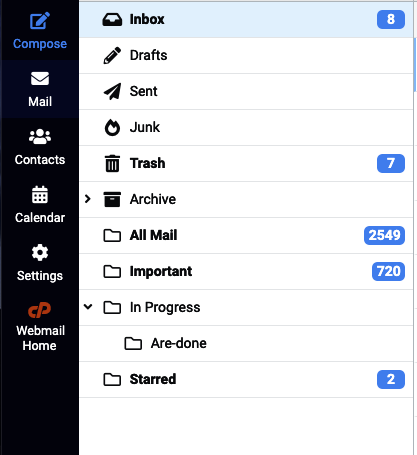
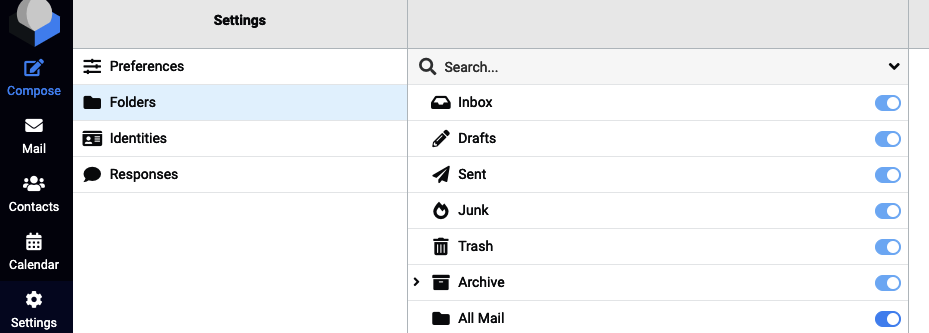
A mailbox can have many folders. These include INBOX, SENT, DRAFTS, JUNK, etc.You can also create custom folders for example to archive email.Sometimes after a mailbox transfer, or when setting up email on a new email device, the folders might appear missing.This is almost always because the folders have not been synchronised.In your mail client, you can find the option to synchronise your folders and then select the folders to add. They should then appear in your mail client.
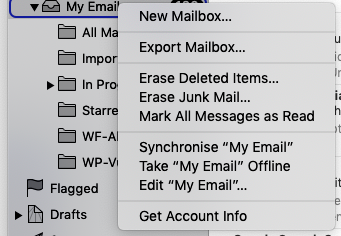
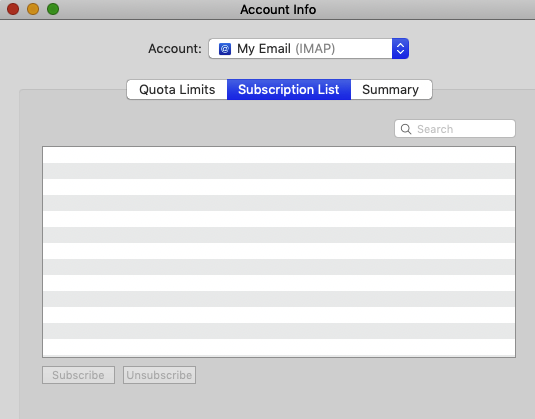
On Mac Mail, you can right click the mailbox and click ‘Get Account Info’
{"docsConfig":{"theme":"mint","$schema":"https://mintlify.com/docs.json","name":"Stablepoint","colors":{"primary":"#0E0E19","light":"#FFE400","dark":"#0E0E19"},"logo":{"light":"https://mintcdn.com/stablepoint/YgwBPen3kVXxUv_C/logo/light.svg?fit=max\u0026auto=format\u0026n=YgwBPen3kVXxUv_C\u0026q=85\u0026s=49038cdb7e4f8c5d496e9176691757a4","dark":"https://mintcdn.com/stablepoint/YgwBPen3kVXxUv_C/logo/dark.svg?fit=max\u0026auto=format\u0026n=YgwBPen3kVXxUv_C\u0026q=85\u0026s=0d0c9a8df17209236b28aa04f9c740ce"},"favicon":"https://mintlify.s3.us-west-1.amazonaws.com/stablepoint/favicon.svg","navbar":{"links":[],"primary":{"type":"button","label":"Dashboard","href":"https://stablepoint.com/"}},"contextual":{"options":["copy","view","chatgpt","claude","perplexity","mcp","cursor","vscode"],"display":"header"},"styling":{"latex":false},"navigation":{"pages":[]}},"deployment":{"deploymentMetadataValue":{"subdomain":"stablepoint","hasAudioNarration":false,"actualSubdomain":"stablepoint","customDomains":["kb.stablepoint.com"],"gitSource":{"type":"github","owner":"panaras10","repo":"stablepointdocumentslive","deployBranch":"main","contentDirectory":"","isPrivate":true,"mountPath":"","label":""},"chroma":{"collectionId":"3831b2cb-4d7e-43a4-9d6c-0d6272b2bbf3","liveDeploymentHistoryId":"6aa0f0694b97953b619ddcbb","schemaVersion":"v3","latestBuiltDeploymentHistoryId":"6aa0f0694b97953b619ddcbb"},"entitlements":{},"buildId":"6aa0f0694b97953b619ddcbb","clientVersion":"0.0.3971","searchFilterCounts":[{"language":"default","tag":"Stablepoint Web Hosting","count":73},{"language":"default","tag":"Choosing Stablepoint","count":21},{"language":"default","tag":"Email","count":21},{"language":"default","tag":"Accounts \u0026 Billing","count":17},{"language":"default","tag":"Enhance Control Panel","count":17},{"language":"default","tag":"Software guides","count":17},{"language":"default","tag":"Billing \u0026 Accounts","count":15},{"language":"default","tag":"Hosting Overview","count":13},{"language":"default","tag":"Reseller Hosting","count":12},{"language":"default","tag":"Databases","count":12}]},"assistantConfig":{"enableAskAiButton":false,"enableStarterQuestions":false,"enableContextualStarterQuestions":false,"enableAskAiSearchBar":true},"basePath":"","hasChatPermissions":false,"hasWebMcpPermissions":false,"toggles":[{"name":"kill-isr","enabled":true,"variant":{"name":"disabled","enabled":false,"feature_enabled":true},"impressionData":false},{"name":"agent-mintlify-slack","enabled":true,"variant":{"name":"disabled","enabled":false,"feature_enabled":true},"impressionData":false},{"name":"editor-v7-file-tree","enabled":true,"variant":{"name":"disabled","enabled":false,"feature_enabled":true},"impressionData":false},{"name":"agent-integrations-settings","enabled":true,"variant":{"name":"disabled","enabled":false,"feature_enabled":true},"impressionData":false},{"name":"automations-pr-grouping","enabled":true,"variant":{"name":"disabled","enabled":false,"feature_enabled":true},"impressionData":false},{"name":"custom-prefix","enabled":true,"variant":{"name":"disabled","enabled":false,"feature_enabled":true},"impressionData":false},{"name":"analytics-v7","enabled":true,"variant":{"name":"disabled","enabled":false,"feature_enabled":true},"impressionData":false},{"name":"user-flows-analytics","enabled":true,"variant":{"name":"disabled","enabled":false,"feature_enabled":true},"impressionData":false},{"name":"no-publish-flow","enabled":true,"variant":{"name":"disabled","enabled":false,"feature_enabled":true},"impressionData":false},{"name":"workos-onboarding","enabled":true,"variant":{"name":"disabled","enabled":false,"feature_enabled":true},"impressionData":false},{"name":"llms-txt-v2","enabled":true,"variant":{"name":"disabled","enabled":false,"feature_enabled":true},"impressionData":false},{"name":"pause-universal-search-reconcile","enabled":true,"variant":{"name":"disabled","enabled":false,"feature_enabled":true},"impressionData":false},{"name":"snapshot-serving-live","enabled":true,"variant":{"name":"disabled","enabled":false,"feature_enabled":true},"impressionData":false},{"name":"stripTemperatureMiddleware","enabled":true,"variant":{"name":"disabled","enabled":false,"feature_enabled":true},"impressionData":false},{"name":"per-site-search-delta","enabled":true,"variant":{"name":"disabled","enabled":false,"feature_enabled":true},"impressionData":false},{"name":"support-platform-pylon-zendesk","enabled":true,"variant":{"name":"disabled","enabled":false,"feature_enabled":true},"impressionData":false},{"name":"snapshot-serving","enabled":true,"variant":{"name":"disabled","enabled":false,"feature_enabled":true},"impressionData":false},{"name":"instant-rollback","enabled":true,"variant":{"name":"disabled","enabled":false,"feature_enabled":true},"impressionData":false},{"name":"granular-notifications-server","enabled":true,"variant":{"name":"disabled","enabled":false,"feature_enabled":true},"impressionData":false},{"name":"granular-notifications","enabled":true,"variant":{"name":"disabled","enabled":false,"feature_enabled":true},"impressionData":false},{"name":"editor-private-page-search","enabled":true,"variant":{"name":"disabled","enabled":false,"feature_enabled":true},"impressionData":false},{"name":"automations-fable","enabled":true,"variant":{"name":"disabled","enabled":false,"feature_enabled":true},"impressionData":false},{"name":"fixed-ai-action-pricing","enabled":true,"variant":{"name":"disabled","enabled":false,"feature_enabled":true},"impressionData":false},{"name":"automation-resolve-merge-conflict","enabled":true,"variant":{"name":"disabled","enabled":false,"feature_enabled":true},"impressionData":false},{"name":"scoped-publishing","enabled":true,"variant":{"name":"disabled","enabled":false,"feature_enabled":true},"impressionData":false},{"name":"mintql","enabled":true,"variant":{"name":"disabled","enabled":false,"feature_enabled":true},"impressionData":false},{"name":"page-level-analytics","enabled":true,"variant":{"name":"disabled","enabled":false,"feature_enabled":true},"impressionData":false},{"name":"editor-version-history-v2","enabled":true,"variant":{"name":"disabled","enabled":false,"feature_enabled":true},"impressionData":false},{"name":"editor-nav-generations","enabled":true,"variant":{"name":"disabled","enabled":false,"feature_enabled":true},"impressionData":false},{"name":"billing-page-v2","enabled":true,"variant":{"name":"disabled","enabled":false,"feature_enabled":true},"impressionData":false},{"name":"workspace-projects","enabled":true,"variant":{"name":"disabled","enabled":false,"feature_enabled":true},"impressionData":false},{"name":"assistant-v5","enabled":true,"variant":{"name":"disabled","enabled":false,"feature_enabled":true},"impressionData":false},{"name":"byok-sep-25","enabled":true,"variant":{"name":"disabled","enabled":false,"feature_enabled":true},"impressionData":false},{"name":"fork-pr-previews","enabled":true,"variant":{"name":"disabled","enabled":false,"feature_enabled":true},"impressionData":false},{"name":"revalidation-jwt","enabled":true,"variant":{"name":"disabled","enabled":false,"feature_enabled":true},"impressionData":false},{"name":"vite-origin","enabled":true,"variant":{"name":"disabled","enabled":false,"feature_enabled":true},"impressionData":false},{"name":"editor-agent-model-picker","enabled":true,"variant":{"name":"disabled","enabled":false,"feature_enabled":true},"impressionData":false},{"name":"billing-updated-9-15","enabled":true,"variant":{"name":"disabled","enabled":false,"feature_enabled":true},"impressionData":false},{"name":"workos-sso-scim","enabled":true,"variant":{"name":"disabled","enabled":false,"feature_enabled":true},"impressionData":false},{"name":"hobby-abuse-scan","enabled":true,"variant":{"name":"disabled","enabled":false,"feature_enabled":true},"impressionData":false},{"name":"dashboard-inbox","enabled":true,"variant":{"name":"disabled","enabled":false,"feature_enabled":true},"impressionData":false},{"name":"workos-signup","enabled":true,"variant":{"name":"disabled","enabled":false,"feature_enabled":true},"impressionData":false},{"name":"workos-enabled","enabled":true,"variant":{"name":"disabled","enabled":false,"feature_enabled":true},"impressionData":false}],"isAtlas":false,"googleFontsInlined":false},"customCss":[],"page":{"pagePath":"email/email-troubleshooting/my-email-folders-are-missing","slug":"/email/email-troubleshooting/my-email-folders-are-missing","pageMetadata":{"title":"My Email Folders are Missing","description":null,"href":"/email/email-troubleshooting/my-email-folders-are-missing"},"pageType":"default","mdx":{"mdxSource":{"compiledSource":"\"use strict\";const{Fragment:_Fragment,jsx:_jsx,jsxs:_jsxs}=arguments[0];const{useMDXComponents:_provideComponents}=arguments[0];function _createMdxContent(props){const _components={img:`img`,p:`p`,..._provideComponents(),...props.components},{Heading}=_components;if(!Heading)_missingMdxReference(`Heading`,true);return _jsxs(_Fragment,{children:[_jsx(_components.p,{children:`A mailbox can have many folders. These include INBOX, SENT, DRAFTS, JUNK, etc.`}),`\n`,_jsx(_components.p,{children:`You can also create custom folders for example to archive email.`}),`\n`,_jsx(_components.p,{children:`Sometimes after a mailbox transfer, or when setting up email on a new email device, the folders might appear missing.`}),`\n`,_jsx(_components.p,{children:`This is almost always because the folders have not been synchronised.`}),`\n`,_jsx(_components.p,{children:`In your mail client, you can find the option to synchronise your folders and then select the folders to add. They should then appear in your mail client.`}),`\n`,_jsx(Heading,{level:`2`,id:`synchronising-folders-in-webmail`,children:`Synchronising Folders in Webmail`}),`\n`,_jsx(_components.p,{children:`Roundcube allows you to subscribe or unsubscribe to folders.`}),`\n`,_jsx(_components.p,{children:_jsx(_components.img,{src:`https://files.readme.io/b317bc2-Screenshot_2022-02-23_at_19.03.23.png`,alt:`Screenshot 2022-02-23 at 19.03.23`})}),`\n`,_jsx(_components.p,{children:_jsx(_components.img,{src:`https://files.readme.io/2406e97-Screenshot_2022-02-23_at_19.03.33.png`,alt:`Screenshot 2022-02-23 at 19.03.33`})}),`\n`,_jsx(Heading,{level:`2`,id:`on-mac-mail`,children:`On Mac Mail`}),`\n`,_jsx(_components.p,{children:`On Mac Mail, you can right click the mailbox and click ‘Get Account Info’`}),`\n`,_jsx(_components.p,{children:_jsx(_components.img,{src:`https://files.readme.io/e8dc252-Screenshot_2022-02-23_at_19.06.00.png`,alt:`Screenshot 2022-02-23 at 19.06.00`})}),`\n`,_jsx(_components.p,{children:_jsx(_components.img,{src:`https://files.readme.io/48c4cc9-Screenshot_2022-02-23_at_19.06.14.png`,alt:`Screenshot 2022-02-23 at 19.06.14`})})]})}function MDXContent(props={}){const{wrapper:MDXLayout}={..._provideComponents(),...props.components};return MDXLayout?_jsx(MDXLayout,{...props,children:_jsx(_createMdxContent,{...props})}):_createMdxContent(props)}return{default:MDXContent};function _missingMdxReference(id,component){throw new Error(`Expected `+(component?`component`:`object`)+\" `\"+id+\"` to be defined: you likely forgot to import, pass, or provide it.\")}","frontmatter":{},"scope":{"config":{},"pageMetadata":{"title":"My Email Folders are Missing","description":null,"href":"/email/email-troubleshooting/my-email-folders-are-missing"}}},"mdxSourceWithNoJs":null},"mdxExtracts":{"tableOfContents":[{"title":"Synchronising Folders in Webmail","slug":"synchronising-folders-in-webmail","depth":2,"children":[]},{"title":"On Mac Mail","slug":"on-mac-mail","depth":2,"children":[]}],"codeExamples":{}},"jsLinks":[],"subdomain":"stablepoint","siteName":"Stablepoint","title":"My Email Folders are Missing - Stablepoint","navMaps":{"firstHrefInVersion":{},"firstHrefInLanguage":{}},"lastModified":"2026-09-09T05:37:00.958Z","originalFileLocation":"email/email-troubleshooting/my-email-folders-are-missing.mdx"},"headHtml":"\u003cscript data-mint-head>(function(){var d=document.documentElement,p=null;if(!p){try{p=localStorage.getItem(\"isDarkMode\")}catch(e){}if(p==='true')p='dark';else if(p==='false')p='light';if(p!=='light'\u0026\u0026p!=='dark'\u0026\u0026p!=='system')p=\"system\"}var r=p==='system'?(matchMedia(\"(prefers-color-scheme: dark)\").matches?'dark':'light'):p;d.classList.remove(r==='dark'?'light':'dark');d.classList.add(r);d.setAttribute(\"data-theme-preference\",p)})();\u003c/script>\u003cmeta data-mint-head name=\"application-name\" content=\"Stablepoint\">\u003cmeta data-mint-head name=\"generator\" content=\"Mintlify\">\u003clink data-mint-head rel=\"apple-touch-icon\" type=\"image/svg+xml\" sizes=\"180x180\" href=\"https://mintlify.s3.us-west-1.amazonaws.com/stablepoint/favicon.svg\">\u003clink data-mint-head rel=\"icon\" type=\"image/svg+xml\" sizes=\"32x32\" href=\"https://mintlify.s3.us-west-1.amazonaws.com/stablepoint/favicon.svg\">\u003clink data-mint-head rel=\"icon\" type=\"image/svg+xml\" sizes=\"16x16\" href=\"https://mintlify.s3.us-west-1.amazonaws.com/stablepoint/favicon.svg\">\u003clink data-mint-head rel=\"shortcut icon\" type=\"image/svg+xml\" href=\"https://mintlify.s3.us-west-1.amazonaws.com/stablepoint/favicon.svg\">\u003cmeta data-mint-head property=\"og:title\" content=\"My Email Folders are Missing - Stablepoint\">\u003cmeta data-mint-head property=\"og:site_name\" content=\"Stablepoint\">\u003cmeta data-mint-head property=\"og:url\" content=\"https://kb.stablepoint.com/email/email-troubleshooting/my-email-folders-are-missing\">\u003cmeta data-mint-head property=\"og:type\" content=\"website\">\u003cmeta data-mint-head property=\"og:image\" content=\"https://stablepoint.mintlify.app/_mintlify/api/og/v2?division=Email+troubleshooting\u0026amp;title=My+Email+Folders+are+Missing\u0026amp;theme=7b93525359c7239a89379a34\u0026amp;signature=baaed4be149876e5c35c74d0b068703f234efcf87b7d68cdb967ce49fd334db1\">\u003cmeta data-mint-head property=\"og:image:width\" content=\"1200\">\u003cmeta data-mint-head property=\"og:image:height\" content=\"630\">\u003cmeta data-mint-head name=\"twitter:card\" content=\"summary_large_image\">\u003cmeta data-mint-head name=\"twitter:title\" content=\"My Email Folders are Missing - Stablepoint\">\u003cmeta data-mint-head name=\"twitter:image\" content=\"https://stablepoint.mintlify.app/_mintlify/api/og/v2?division=Email+troubleshooting\u0026amp;title=My+Email+Folders+are+Missing\u0026amp;theme=7b93525359c7239a89379a34\u0026amp;signature=baaed4be149876e5c35c74d0b068703f234efcf87b7d68cdb967ce49fd334db1\">\u003cmeta data-mint-head name=\"twitter:image:width\" content=\"1200\">\u003cmeta data-mint-head name=\"twitter:image:height\" content=\"630\">\u003cmeta data-mint-head name=\"msapplication-config\" content=\"https://mintlify.s3.us-west-1.amazonaws.com/stablepoint/_generated/favicon/browserconfig.xml?v=3\">\u003cmeta data-mint-head name=\"apple-mobile-web-app-title\" content=\"Stablepoint\">\u003cmeta data-mint-head name=\"msapplication-TileColor\" content=\"#0E0E19\">\u003clink data-mint-head rel=\"canonical\" href=\"https://kb.stablepoint.com/email/email-troubleshooting/my-email-folders-are-missing\">\u003clink data-mint-head rel=\"alternate\" type=\"application/xml\" href=\"/sitemap.xml\">\u003clink data-mint-head rel=\"alternate\" type=\"text/markdown\" href=\"/email/email-troubleshooting/my-email-folders-are-missing.md\">\u003cscript data-mint-head type=\"application/ld+json\">{\"@context\":\"https://schema.org\",\"@graph\":[{\"@type\":\"Organization\",\"@id\":\"https://kb.stablepoint.com/#organization\",\"name\":\"Stablepoint\",\"url\":\"https://kb.stablepoint.com\",\"logo\":{\"@type\":\"ImageObject\",\"url\":\"https://mintcdn.com/stablepoint/YgwBPen3kVXxUv_C/logo/light.svg?fit=max\u0026auto=format\u0026n=YgwBPen3kVXxUv_C\u0026q=85\u0026s=49038cdb7e4f8c5d496e9176691757a4\"}},{\"@type\":\"WebSite\",\"@id\":\"https://kb.stablepoint.com#website\",\"name\":\"Stablepoint\",\"url\":\"https://kb.stablepoint.com\",\"publisher\":{\"@id\":\"https://kb.stablepoint.com/#organization\"}},{\"@type\":\"WebPage\",\"@id\":\"https://kb.stablepoint.com/email/email-troubleshooting/my-email-folders-are-missing#webpage\",\"url\":\"https://kb.stablepoint.com/email/email-troubleshooting/my-email-folders-are-missing\",\"name\":\"My Email Folders are Missing\",\"dateModified\":\"2026-09-09T05:37:00.958Z\",\"isPartOf\":{\"@id\":\"https://kb.stablepoint.com#website\"},\"breadcrumb\":{\"@id\":\"https://kb.stablepoint.com/email/email-troubleshooting/my-email-folders-are-missing#breadcrumb\"}},{\"@type\":\"BreadcrumbList\",\"@id\":\"https://kb.stablepoint.com/email/email-troubleshooting/my-email-folders-are-missing#breadcrumb\",\"itemListElement\":[{\"@type\":\"ListItem\",\"position\":1,\"name\":\"Email\",\"item\":\"https://kb.stablepoint.com/email/email/overview\"},{\"@type\":\"ListItem\",\"position\":2,\"name\":\"Email troubleshooting\",\"item\":\"https://kb.stablepoint.com/email/email-troubleshooting/overview\"},{\"@type\":\"ListItem\",\"position\":3,\"name\":\"My Email Folders are Missing\",\"item\":\"https://kb.stablepoint.com/email/email-troubleshooting/my-email-folders-are-missing\"}]},{\"@type\":[\"Article\",\"TechArticle\"],\"@id\":\"https://kb.stablepoint.com/email/email-troubleshooting/my-email-folders-are-missing#article\",\"headline\":\"My Email Folders are Missing\",\"name\":\"My Email Folders are Missing\",\"url\":\"https://kb.stablepoint.com/email/email-troubleshooting/my-email-folders-are-missing\",\"mainEntityOfPage\":{\"@id\":\"https://kb.stablepoint.com/email/email-troubleshooting/my-email-folders-are-missing#webpage\"},\"dateModified\":\"2026-09-09T05:37:00.958Z\",\"publisher\":{\"@id\":\"https://kb.stablepoint.com/#organization\"},\"isPartOf\":{\"@id\":\"https://kb.stablepoint.com#website\"}}]}\u003c/script>\u003cscript data-mint-head type=\"application/ld+json\">{\"@context\":\"https://schema.org\",\"@type\":\"WebSite\",\"name\":\"Stablepoint\",\"creator\":{\"@type\":\"Organization\",\"name\":\"Mintlify\",\"url\":\"https://mintlify.com\"}}\u003c/script>","siteName":"Stablepoint","nav":{"global":null,"pages":[{"title":"Stablepoint Knowledge Base","mode":"custom","href":"/index"},{"group":"Choosing Stablepoint","pages":[{"group":"Why Choose Stablepoint?","pages":[{"title":"Why Choose Stablepoint?","href":"/choosing-stablepoint/moving-to-stablepoint/overview"},{"title":"What is Web Hosting?","href":"/choosing-stablepoint/moving-to-stablepoint/what-is-web-hosting"},{"title":"How to Order Your Hosting Account","href":"/choosing-stablepoint/moving-to-stablepoint/how-to-order-your-hosting-account"},{"title":"Choosing a server location","href":"/choosing-stablepoint/moving-to-stablepoint/hosting-location-choices"},{"title":"Migration process","href":"/choosing-stablepoint/moving-to-stablepoint/migration-process"},{"title":"Previewing websites","href":"/choosing-stablepoint/moving-to-stablepoint/how-to-preview-your-website-on-our-servers"},{"title":"Pointing your domain","href":"/choosing-stablepoint/moving-to-stablepoint/how-long-does-dns-take-to-propagate"},{"title":"cPanel Transfers","href":"/choosing-stablepoint/moving-to-stablepoint/cpanel-transfers"},{"title":"Email migration","href":"/choosing-stablepoint/moving-to-stablepoint/email-migration"},{"title":"Upgrading and Downgrading","href":"/choosing-stablepoint/moving-to-stablepoint/upgrading-and-downgrading"},{"title":"Server Maintenance Policy","href":"/choosing-stablepoint/legal/server-maintenance-policy"}]},{"title":"Server Specification","href":"/choosing-stablepoint/server-specification"},{"group":"Offers \u0026 Limitations","pages":[{"title":"Offers \u0026 Limitations","href":"/choosing-stablepoint/offers-limitations/overview"},{"title":"Money-Back Guarantee","href":"/choosing-stablepoint/offers-limitations/money-back-guarantee"},{"title":"LVE Resource Limits Explained","href":"/choosing-stablepoint/offers-limitations/lve-limits-explained"},{"title":"Banned countries","href":"/choosing-stablepoint/offers-limitations/countries-with-potential-service-restrictions"},{"title":"Content Restrictions and DMCA Compliance","href":"/choosing-stablepoint/offers-limitations/content-restrictions-and-dmca-compliance"},{"title":"Can you host adult content?","href":"/choosing-stablepoint/offers-limitations/can-you-host-adult-content"},{"title":"Email Limits","href":"/choosing-stablepoint/offers-limitations/email-limits"},{"title":"Charity Hosting","href":"/choosing-stablepoint/offers-limitations/charity-and-not-for-profit-hosting"},{"title":"Discounts and Promo Codes","href":"/choosing-stablepoint/offers-limitations/discounts-and-promo-codes"}]}]},{"group":"Stablepoint Web Hosting","pages":[{"group":"Hosting Overview","pages":[{"title":"Hosting Overview","href":"/web-hosting/hosting-overview/overview"},{"title":"Running Multiple Websites","href":"/web-hosting/hosting-overview/running-multiple-websites"},{"title":"LVE Limits Explained","href":"/web-hosting/hosting-overview/lve-limits-explained-1"},{"title":"How to change your WHM/cPanel password","href":"/web-hosting/hosting-overview/how-to-change-your-cpanel-password"},{"title":"How to Increase the PHP Max Upload Size in cPanel?","href":"/web-hosting/hosting-overview/increase-cpanel-php-upload-size"},{"title":"How to Forward a Domain","href":"/web-hosting/hosting-overview/how-to-forward-a-domain"},{"title":"Addon Domain","href":"/web-hosting/hosting-overview/addon-domain"},{"title":"Sub Domains","href":"/web-hosting/hosting-overview/sub-domains"},{"title":"Aliases vs. Redirects","href":"/web-hosting/hosting-overview/aliases-vs-redirects"},{"title":"FFMPEG Support","href":"/web-hosting/hosting-overview/ffmpeg-support"},{"title":"How to Create a Cookie-Free Domain for WordPress","href":"/web-hosting/hosting-overview/how-to-create-a-cookie-free-domain-for-wordpress"},{"title":"How to fix contact form not working","href":"/web-hosting/hosting-overview/how-to-fix-contact-form-not-working"},{"title":"What is 403 forbidden error and how to fix it","href":"/web-hosting/hosting-overview/what-is-403-forbidden-error-and-how-to-fix-it"}]},{"group":"Files and Access","pages":[{"title":"Files and Access","href":"/web-hosting/files-and-access/overview"},{"title":"Managing Files in cPanel","href":"/web-hosting/files-and-access/managing-files-in-cpanel"},{"title":"Using FTP","href":"/web-hosting/files-and-access/using-ftp"},{"title":"How to create FTP account","href":"/web-hosting/files-and-access/how-to-create-ftp-account"},{"title":"How to Configure and Manage WebDAV Web Disks With cPanel","href":"/web-hosting/files-and-access/how-to-configure-and-manage-webdav-web-disks-with-cpanel"},{"title":"Managing Disk Usage","href":"/web-hosting/files-and-access/managing-disk-usage"},{"title":"How to Use PuTTY SSH with cPanel","href":"/web-hosting/files-and-access/how-to-use-putty-ssh-with-cpanel"},{"title":"Secure Shell (SSH) Overview","href":"/web-hosting/files-and-access/secure-shell-ssh-overview"},{"title":"How to use the cPanel terminal","href":"/web-hosting/files-and-access/how-to-use-the-cpanel-terminal"},{"title":"How To Clone A Website In cPanel","href":"/web-hosting/files-and-access/how-to-clone-a-website-in-cpanel"},{"title":"How to create a WordPress staging site with cPanel","href":"/web-hosting/files-and-access/how-to-create-a-wordpress-staging-site-with-cpanel"},{"title":"How can I give access to my developer","href":"/web-hosting/files-and-access/how-can-i-give-access-to-my-developer"}]},{"group":"Databases","pages":[{"title":"Databases","href":"/web-hosting/databases/overview"},{"title":"Creating MySQL Databases and Users","href":"/web-hosting/databases/creating-mysql-databases-and-users"},{"title":"Using phpMyAdmin","href":"/web-hosting/databases/using-phpmyadmin"},{"title":"How to use a remote MySQL database with cPanel","href":"/web-hosting/databases/how-to-use-a-remote-mysql-database-with-cpanel"},{"title":"Importing and Exporting as SQL","href":"/web-hosting/databases/importing-and-exporting-as-sql"},{"title":"Remote database connections","href":"/web-hosting/databases/remote-database-connections"},{"title":"How to create separate database access","href":"/web-hosting/databases/how-to-create-separate-database-access"},{"title":"How to change your Wordpress password from the database","href":"/web-hosting/databases/how-to-change-your-wordpress-password-from-the-database"},{"title":"What databases do we provide?","href":"/web-hosting/databases/database-overview"},{"title":"Database Privileges","href":"/web-hosting/databases/database-privileges"},{"title":"MySQL Stored Procedures","href":"/web-hosting/databases/mysql-stored-procedures"},{"title":"Choosing between VARCHAR and TEXT in MySQL","href":"/web-hosting/databases/choosing-between-varchar-and-text-in-mysql"}]},{"group":"Backups","pages":[{"title":"Backups","href":"/web-hosting/backups/overview"},{"title":"How to restore your database or files using JetBackup","href":"/web-hosting/backups/how-to-restore-your-database-or-files-using-jetbackup"},{"title":"JetBackup 5","href":"/web-hosting/backups/jetbackup-5"},{"title":"Backuply","href":"/web-hosting/backups/backuply"}]},{"group":"Performance and Advanced","pages":[{"title":"Performance and Advanced","href":"/web-hosting/performance/overview"},{"title":"Hosting Performance Tweaks: Opcode Caching, Expires Headers, and Gzip Compression","href":"/web-hosting/performance/hosting-performance-tweaks-opcode-caching-expires-headers-and-gzip-compression"},{"title":"HTTP/2 Overview","href":"/web-hosting/performance/http-2-overview"},{"title":"Cron Jobs","href":"/web-hosting/performance/cron-jobs"},{"title":"Where do we have NVMe servers?","href":"/web-hosting/performance/where-do-we-have-nvme-servers"},{"title":"What is the average server specification?","href":"/web-hosting/performance/what-is-the-average-server-specification"},{"title":"Can we enable LiteSpeed Crawler?","href":"/web-hosting/performance/can-we-enable-litespeed-crawler"},{"title":"Setting timezones in PHP","href":"/web-hosting/performance/setting-timezones-in-php"}]},{"group":"Software guides","pages":[{"title":"Software guides","href":"/web-hosting/software-guides/overview"},{"title":"Using the Softaculous Autoinstaller","href":"/web-hosting/software-guides/using-the-softacoulous-autoinstaller"},{"title":"Manually installing software","href":"/web-hosting/software-guides/manually-installing-software"},{"title":"How to change your PHP version in cPanel","href":"/web-hosting/software-guides/how-to-change-your-php-version-in-cpanel"},{"title":"How to change your timezone in cPanel","href":"/web-hosting/software-guides/how-to-change-your-timezone-in-cpanel"},{"title":"How to increase your PHP maximum execution time","href":"/web-hosting/software-guides/how-to-increase-your-php-maximum-execution-time"},{"title":"How to install WordPress","href":"/web-hosting/software-guides/how-to-install-wordpress"},{"title":"Using Node.js apps","href":"/web-hosting/software-guides/using-nodejs-apps"},{"title":"Python applications","href":"/web-hosting/software-guides/python-applications"},{"title":"How to host Git repositories with cPanel","href":"/web-hosting/software-guides/how-to-host-git-repositories-with-cpanel"},{"title":"How to host Dynamic DNS domains with cPanel","href":"/web-hosting/software-guides/how-to-host-dynamic-dns-domains-with-cpanel"},{"title":"Can I livestream audio or video?","href":"/web-hosting/software-guides/can-i-livestream-audio-or-video"},{"title":"How to edit my WordPress website in cPanel using WP Toolkit","href":"/web-hosting/software-guides/how-to-edit-my-wordpress-website-in-cpanel-using-wp-toolkit"},{"title":"How do I upload a project to cPanel using WP Toolkit","href":"/web-hosting/software-guides/how-do-i-upload-a-project-to-cpanel-using-wp-toolkit"},{"title":"WP Toolkit Lite vs WP Toolkit Deluxe: A feature comparison","href":"/web-hosting/software-guides/wp-toolkit-lite-vs-wp-toolkit-deluxe-a-feature-comparison"},{"title":"How to debug WordPress with cPanel and WordPress Toolkit","href":"/web-hosting/software-guides/how-to-debug-wordpress-with-cpanel-and-wordpress-toolkit"},{"title":"How to run a different PHP version in the subdomain/addon domain","href":"/web-hosting/software-guides/how-to-run-a-different-php-version-in-the-subdomainaddon-domain"}]},{"title":"How long does it take to set up my account?","href":"/web-hosting/how-long-does-it-take-to-set-up-my-account"},{"title":"SSL Certificates","href":"/web-hosting/ssl-certificates-1"},{"title":"Changing your main domain","href":"/web-hosting/changing-your-main-domain"},{"title":"Firewall IP block","href":"/web-hosting/firewall-ip-block"},{"title":"Can I enable cPanel's 2FA feature?","href":"/web-hosting/can-i-enable-cpanels-2fa-feature"},{"title":"Site Migrations","href":"/web-hosting/site-migrations"},{"title":"Getting Started with cPanel Web Hosting","href":"/web-hosting/cpanel-hosting-overview"}]},{"group":"Domain Management","pages":[{"group":"Registering Domains","pages":[{"title":"Registering Domains","href":"/domain-management/registering-domains/overview"},{"title":"Premium Domain Names","href":"/domain-management/registering-domains/premium-domain-names"},{"title":"Do we still need Whois Privacy Protection?","href":"/domain-management/registering-domains/do-we-still-need-whois-privacy-protection"}]},{"group":"Domain Transfers","pages":[{"title":"Domain Transfers","href":"/domain-management/domain-transfers-1/overview"},{"title":"Domain Transfers","href":"/domain-management/domain-transfers-1/domain-transfers"},{"title":"UK Domain Transfers","href":"/domain-management/domain-transfers-1/uk-domain-transfers"}]},{"title":"How to manage your domain?","href":"/domain-management/domain-management"},{"title":"DNS settings","href":"/domain-management/dns-settings"},{"title":"Accessing your web site before DNS propagation is complete","href":"/domain-management/accessing-your-website-before-DNS-propagation"}]},{"group":"Email","pages":[{"group":"Managing Email Accounts","pages":[{"title":"Managing Email Accounts","href":"/email/email/overview"},{"title":"Creating an email account","href":"/email/email/creating-an-email-account"},{"title":"Changing your Email Password","href":"/email/email/changing-your-email-password"},{"title":"Setting up an Email Forwarder","href":"/email/email/setting-up-an-email-forwarder"},{"title":"Setting up MX Records","href":"/email/email/setting-up-mx-records"}]},{"group":"Accessing email","pages":[{"title":"Accessing email","href":"/email/accessing-email/overview"},{"title":"How to access Webmail","href":"/email/accessing-email/how-to-access-webmail"},{"title":"Configuring an email client","href":"/email/accessing-email/configuring-an-email-client"},{"title":"Setup Email Accounts on iPhone","href":"/email/accessing-email/setup-email-accounts-on-iphone"},{"title":"How to easily setup your E-mails with Gmail","href":"/email/accessing-email/how-to-easily-setup-your-e-mails-with-gmail"},{"title":"How to Open and read invoices","href":"/email/accessing-email/how-to-create-and-view-support-tickets"},{"title":"Synchronizing cPanel® Calendar, Contacts, and Email on Android with ActiveSync","href":"/email/accessing-email/synchronizing-cpanel-calendar-contacts-and-email-on-android-with-activesync"}]},{"group":"Email troubleshooting","pages":[{"title":"Email troubleshooting","href":"/email/email-troubleshooting/overview"},{"title":"Configuring Autoresponder for your Email Account","href":"/email/email-troubleshooting/configuring-autoresponder-for-your-email-account"},{"title":"Email Migration","href":"/email/email-troubleshooting/email-migration-1"},{"title":"How to setup auto archive in outlook 365","href":"/email/email-troubleshooting/how-to-setup-auto-archive-in-outlook-365"},{"title":"Why does my mailbox get full?","description":null,"href":"/email/email-troubleshooting/why-does-my-mailbox-get-full"},{"title":"My Email Folders are Missing","href":"/email/email-troubleshooting/my-email-folders-are-missing"}]},{"title":"How to Set Up SMTP in cPanel","description":null,"href":"/email/set-up-cpanel-smtp"},{"title":"How to blacklist/whistelist email account in Cpanel","href":"/email/how-to-blacklistwhistelist-email-account-in-cpanel"},{"title":"How to use Global email filters in Cpanel","href":"/email/how-to-use-global-email-filters-in-cpanel"}]},{"group":"Reseller Hosting","pages":[{"title":"Reseller Hosting Server Specification","href":"/reseller-hosting/reseller-hosting-server-specification"},{"group":"Using Web Host Manager (WHM)","pages":[{"title":"Using Web Host Manager (WHM)","href":"/reseller-hosting/using-web-host-manager-whm/overview"},{"title":"How to upgrade and downgrade packages in WHM","href":"/reseller-hosting/using-web-host-manager-whm/how-to-upgrade-and-downgrade-packages-in-whm"},{"title":"Can resellers set their own LVE Limits?","href":"/reseller-hosting/using-web-host-manager-whm/can-resellers-set-their-own-lve-limits"},{"title":"How to create packages and feature lists in WHM","href":"/reseller-hosting/using-web-host-manager-whm/how-to-create-packages-and-feature-lists-in-whm"},{"title":"How to brand your cpanel reseller hosting","href":"/reseller-hosting/using-web-host-manager-whm/how-to-brand-your-cpanel-reseller-hosting"},{"title":"How to create and manage cPanel accounts in WHM","href":"/reseller-hosting/using-web-host-manager-whm/how-to-create-and-manage-cpanel-accounts-in-whm"},{"title":"How to change a cPanel password in WHM","href":"/reseller-hosting/using-web-host-manager-whm/how-to-change-a-cpanel-password-in-whm"}]},{"title":"Is Reseller Hosting Whitelabel","href":"/reseller-hosting/is-reseller-hosting-whitelabel"},{"title":"How to set up custom nameservers","href":"/reseller-hosting/how-to-set-up-custom-nameservers"},{"group":"Managing Clients and Orders","pages":[{"title":"Managing Clients and Orders","href":"/reseller-hosting/using-upmind-to-bill-my-customers/overview"},{"title":"How to bill my customers","href":"/reseller-hosting/using-upmind-to-bill-my-customers/how-to-bill-my-customers"},{"title":"Linking my WHM account to Upmind","href":"/reseller-hosting/using-upmind-to-bill-my-customers/linking-my-whm-account-to-upmind"}]}]},{"group":"Accounts \u0026 Billing","pages":[{"group":"Billing \u0026 Accounts","pages":[{"title":"Billing \u0026 Accounts","href":"/accounts-billing/billing-accounts/overview"},{"title":"Support Team","href":"/accounts-billing/billing-accounts/support-team"},{"title":"Accessing the Hosting Panel","href":"/accounts-billing/billing-accounts/accessing-the-hosting-panel"},{"title":"Managing your profile in the Hosting Panel","href":"/accounts-billing/billing-accounts/managing-your-profile-in-the-hosting-panel"},{"title":"Managing billing in the Hosting Panel","href":"/accounts-billing/billing-accounts/managing-billing-in-the-hosting-panel"},{"title":"Viewing your Support PIN","href":"/accounts-billing/billing-accounts/viewing-your-support-pin"},{"title":"Working with tickets in the Hosting Panel","href":"/accounts-billing/billing-accounts/working-with-tickets"},{"title":"Updating the default email address for your account","href":"/accounts-billing/billing-accounts/updating-the-default-email-address-for-your-account"},{"title":"Viewing and changing settings for cPanel hosting accounts","href":"/accounts-billing/billing-accounts/viewing-and-changing-settings-for-shared-hosting-accounts"},{"title":"Renewing a domain purchased from Stablepoint","href":"/accounts-billing/billing-accounts/renewing-a-domain"},{"title":"Domain management in the Hosting Panel","href":"/accounts-billing/billing-accounts/domain-management-in-the-hosting-panel"},{"title":"Requesting site migration from another host to Stablepoint","href":"/accounts-billing/billing-accounts/site-migration-request"},{"title":"Cancelling a product or service on the Hosting Panel","href":"/accounts-billing/billing-accounts/cancelling-a-product-or-service-on-the-hosting-panel"},{"title":"Upgrading or downgrading your hosting plan","href":"/accounts-billing/billing-accounts/upgrading-or-downgrading-your-hosting-plan"},{"title":"Recovering account access","href":"/accounts-billing/billing-accounts/recovering-account-access"}]},{"group":"Affiliate System","pages":[{"title":"Affiliate System","href":"/accounts-billing/affiliate-system/overview"},{"title":"How to Use the Stablepoint Affiliate System","href":"/accounts-billing/affiliate-system/how-to-use-the-stablepoint-affiliate-system"}]}]},{"group":"Security","pages":[{"title":"Protecting yourself from email phishing scam attempts","href":"/security/protecting-yourself-from-email-phishing-scam-attempts"},{"title":"Email spoofing","href":"/security/email-spoofing"},{"title":"Choosing a strong password","href":"/security/choosing-a-strong-password"},{"title":"Securing a hacked site","href":"/security/securing-a-hacked-site"},{"title":"Preventing outgoing e-mail from being marked as spam","href":"/security/preventing-outgoing-e-mail-from-being-marked-as-spam"},{"title":"WordPress security","href":"/security/wordpress-security"},{"title":"How to secure an unmanaged server","href":"/security/how-to-secure-an-unmanaged-server"},{"title":"How to generate Google reCAPTCHA keys for site security","href":"/security/how-to-generate-google-recaptcha-keys-for-site-security"}]},{"group":"Enhance Control Panel","pages":[{"title":"From cPanel to Enhance. Everything you need to know.","href":"/enhance-control-panel/from-cpanel-to-enhance-everything-you-need-to-know"},{"title":"Enhance Reseller Hosting — Frequently Asked Questions","href":"/enhance-control-panel/enhance-reseller-hosting-frequently-asked-questions"},{"title":"Adding a new customer to your Enhance Resellers account","href":"/enhance-control-panel/adding-a-new-customer-to-your-enhance-resellers-account"},{"title":"Managing your website, databases and backups in Enhance","href":"/enhance-control-panel/managing-your-website-databases-and-backups-in-enhance"},{"title":"Managing your WordPress site in Enhance","href":"/enhance-control-panel/managing-your-wordpress-site-in-enhance"},{"title":"Installing an SSL certificate in Enhance","href":"/enhance-control-panel/installing-an-ssl-certificate-in-enhance"},{"title":"Managing your domains in Enhance","href":"/enhance-control-panel/managing-your-domains-in-enhance"},{"title":"Managing your email in Enhance","href":"/enhance-control-panel/managing-your-email-in-enhance"},{"title":"Using the File Manager in Enhance","href":"/enhance-control-panel/using-the-file-manager-in-enhance"},{"title":"Managing backups in Enhance","href":"/enhance-control-panel/managing-backups-in-enhance"},{"title":"Managing your MySQL databases in Enhance","href":"/enhance-control-panel/managing-your-mysql-databases-in-enhance"},{"title":"Managing FTP accounts in Enhance","href":"/enhance-control-panel/managing-ftp-accounts-in-enhance"},{"title":"Changing PHP versions and settings in Enhance","href":"/enhance-control-panel/changing-php-versions-and-settings-in-enhance"},{"title":"Configuring SSH access in Enhance","href":"/enhance-control-panel/configuring-ssh-access-in-enhance"},{"title":"How to deploy a Node.js application on Enhance","href":"/enhance-control-panel/how-to-deploy-a-nodejs-application-on-enhance"},{"title":"Creating Unlimited Websites on Your Enhance Reseller Plan","href":"/creating-unlimited-websites-on-your-enhance-reseller-plan"},{"title":"Importing and Restoring a cPanel Account into Enhance","href":"/importing-and-restoring-a-cPanel-account-into-enhance"}]}]},"title":"My Email Folders are Missing - Stablepoint","buildId":"dpl_DFJrtvUi8HS5F9nkooKuDJsuD5BM","deploymentId":"dpl_DFJrtvUi8HS5F9nkooKuDJsuD5BM","dynamics":["a74be98ba7"],"chunks":["zoom-image-lightbox-BZxD9MAj.js","lightbox-handle-r17bVUz3.js"]}