From cPanel to Enhance. Everything you need to know.
You’ve just been moved onto Enhance — our modern control panel platform. Everything you’re used to doing in WHM and cPanel, you can still do here. Often faster. Usually cleaner. And with features cPanel simply doesn’t have. This is your translation guide.
Managing your WordPress site in the Enhance control panel.
Read more →
Enhance is built for today’s hosting professional. It’s quicker, more intuitive, and gives you tools that cPanel doesn’t — like self-service site imports, built-in Cloudflare syncing, one-click WordPress during site creation, and real-time Slack notifications for your business.There’s a short familiarization period, as with any new tool. Most resellers are running comfortably within a day. This guide walks you through the key differences so you can hit the ground running.
In both panels, you’ll want to create your packages before onboarding customers, so you have something to assign when they arrive.Packages in Enhance let you define disk space, bandwidth, number of websites, email accounts, databases, and a range of feature toggles — all in one cleanly laid-out screen.
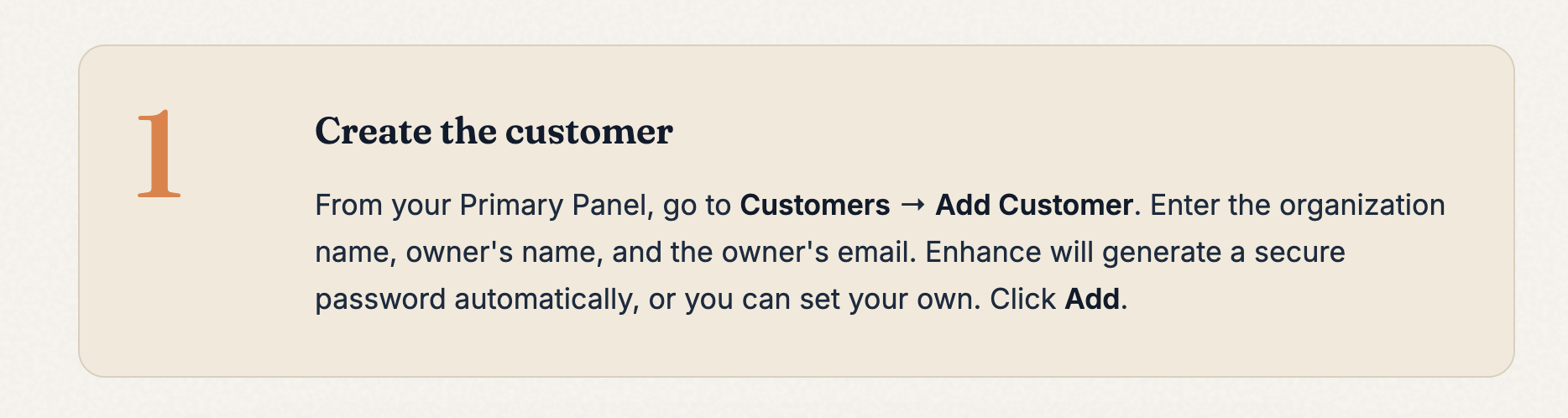
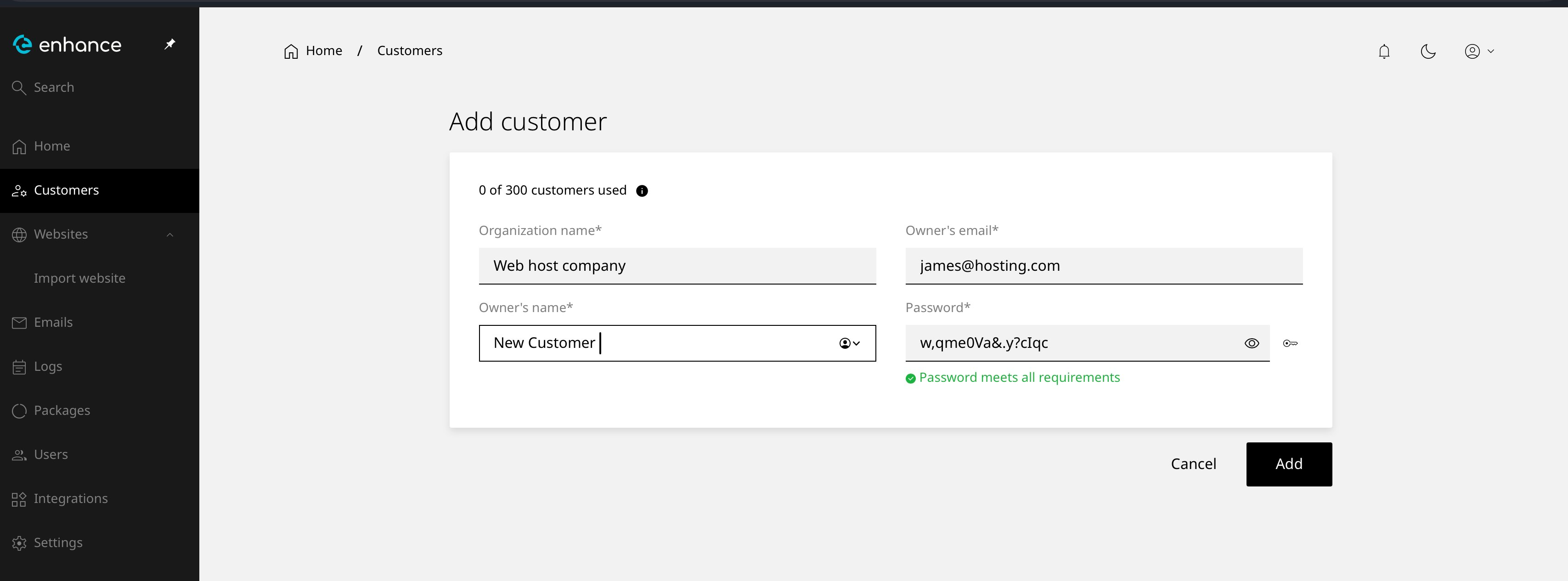
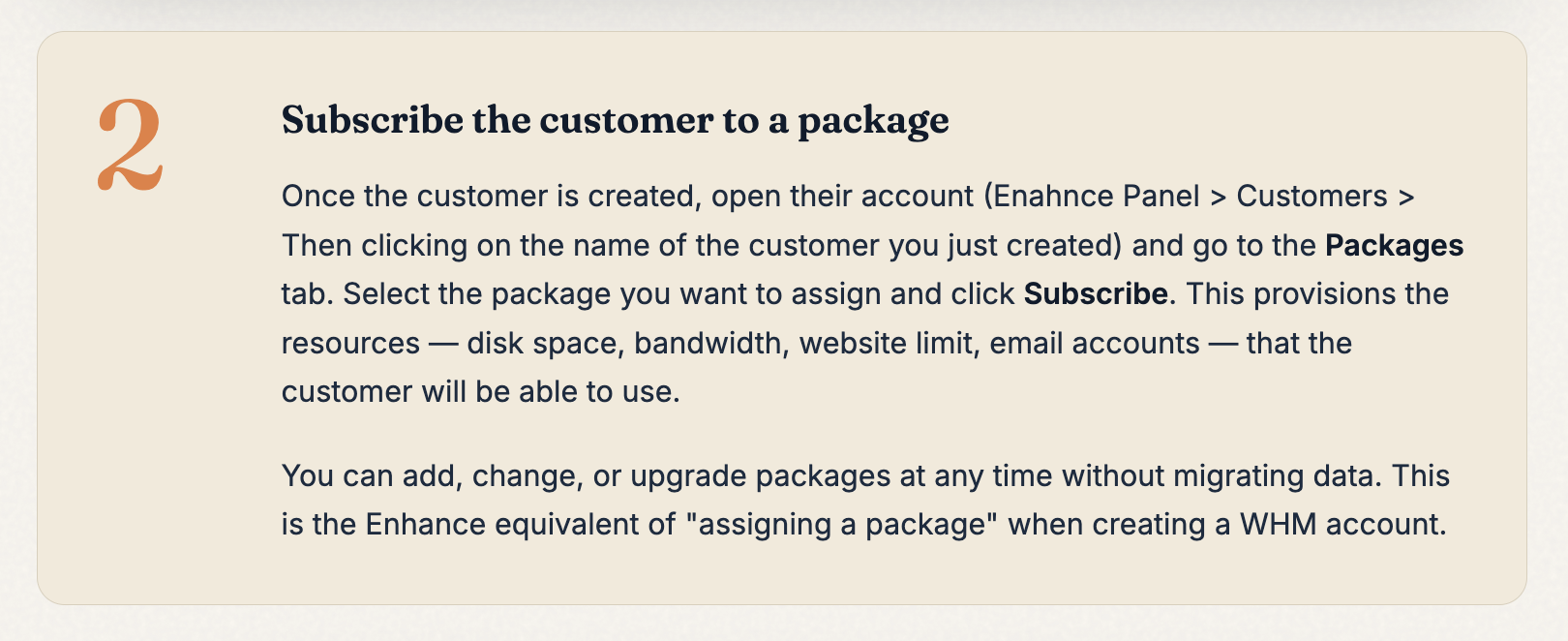
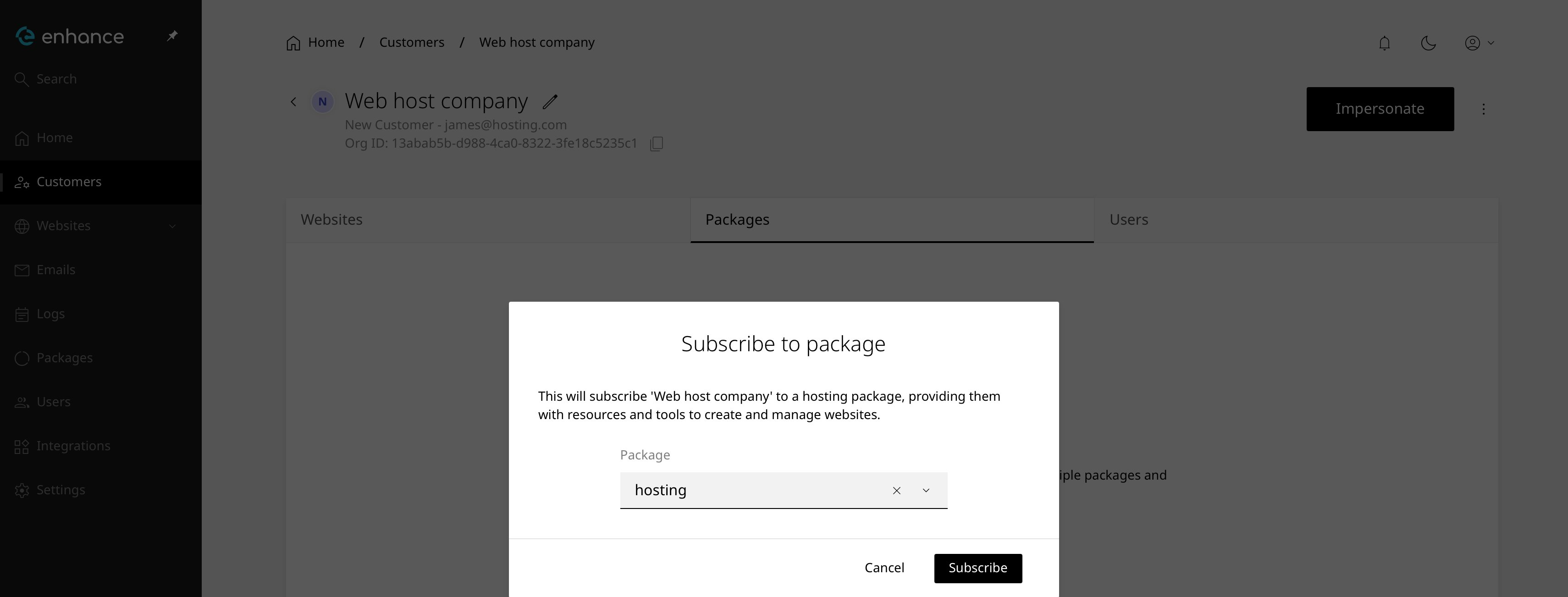
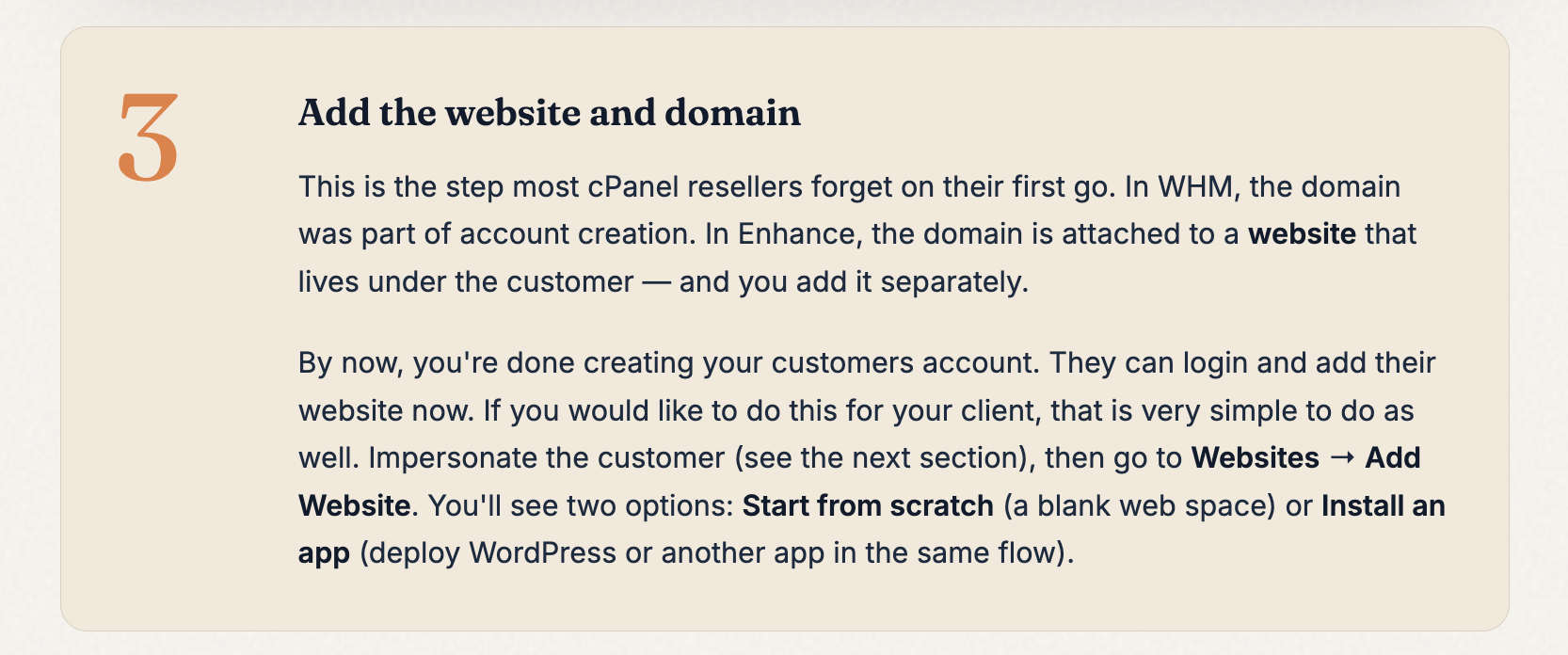
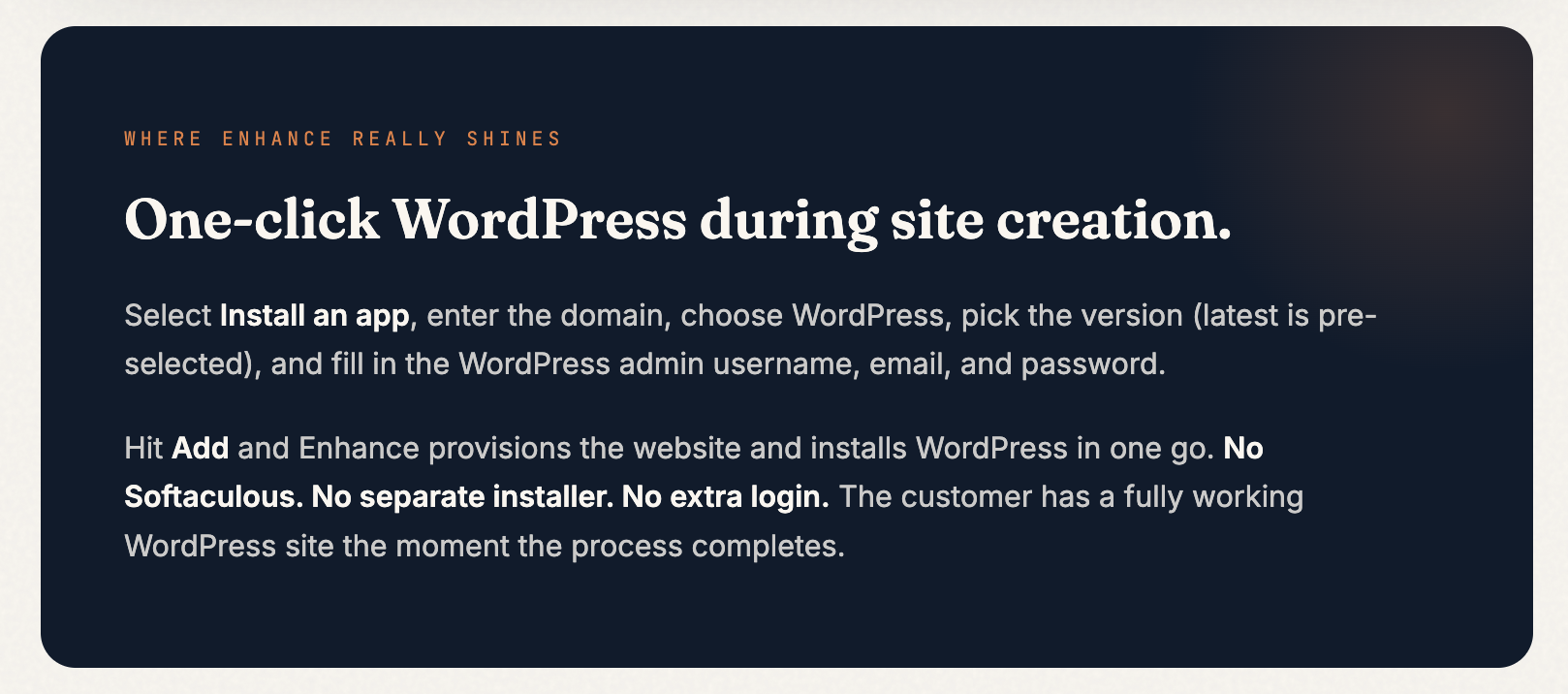
This is the day-to-day task you’ll run most often, and it’s the biggest structural difference between cPanel and Enhance — so pay close attention here.In WHM, creating a new account was a single form: domain, password, package, Create, done. In Enhance, this is broken into three separate steps. It feels like more work at first, but it’s actually more flexible — you can onboard a customer before they’ve picked a domain, change packages independently, and add additional websites under the same customer later without any extra setup.
If you’re onboarding a client who doesn’t have their domain registered yet, you can skip Step 3 entirely for now. The customer and package are ready, and you can come back and add the website whenever the domain is live. Or hand off login details to the client so they can add their own website.
When you need to log into a customer’s account to install WordPress, set up email, check files, or troubleshoot — this is the Enhance equivalent of clicking the little orange cPanel logo in WHM.Once you impersonate, you’ll see a yellow banner across the top of the screen confirming you’re inside the customer’s account. A Return to Admin button in the top-right takes you back to your Primary Panel whenever you’re done.
In cPanel, your customers accessed their accounts via port 2083 (e.g. yourdomain.com:2083) or a redirect to /cpanel.In Enhance, there are no port-based logins or redirects. Instead, you set a branded control panel URL that your customers use to log in — giving your hosting business a more professional appearance from day one.To set this up:Log into your Enhance Primary Panel → Settings → Platform → Control Panel Domain Here you’ll specify the URL your customers will use to access their panel — for example cp.yourdomain.com. You’ll need to point this domain’s DNS to your server before it will work. Once set, your customers visit that URL and log in with the username and password you assigned when creating their customer account.
If you haven’t set a control panel domain yet, your customers won’t have a URL to log into. Set this up before onboarding your first customer so the experience is seamless from the start.
Once you’re impersonating a customer, the left-hand menu gives you everything the customer themselves would see — and it’s where you’ll do most of the day-to-day work a cPanel technician does.
Websites — Add websites, install WordPress, manage SSL, set PHP versions, and access the file manager for each site.
Emails — Create and manage email accounts, forwarders, and aliases.
Logs — Access server and website logs for debugging and audit.
Packages — View package resources and limits.
Users — Manage additional users with access to this customer’s account.
Integrations — Connect Cloudflare, Slack, and other services.
Everything you used to click through the cPanel icons for is here, just organised into clearer sections.
This is one of the biggest benefits in Enhance and something we want to highlight specifically.The entire site — files, databases, emails, DNS — is brought over automatically. No ticket, no waiting, no back-and-forth. For larger or more complex migrations, our support team is still here and can handle the full white-glove migration for you if you prefer.
If something isn’t behaving the way you expect, or you can’t find the equivalent of a cPanel feature you rely on — don’t struggle with it.
Open a support ticket from your client area. Our team is fluent in both panels and can walk you through the cPanel-to-Enhance equivalent of anything.
For migration help specifically, open a ticket and our migrations team will take it from there for you.
{"docsConfig":{"theme":"mint","$schema":"https://mintlify.com/docs.json","name":"Stablepoint","colors":{"primary":"#0E0E19","light":"#FFE400","dark":"#0E0E19"},"logo":{"light":"https://mintcdn.com/stablepoint/YgwBPen3kVXxUv_C/logo/light.svg?fit=max\u0026auto=format\u0026n=YgwBPen3kVXxUv_C\u0026q=85\u0026s=49038cdb7e4f8c5d496e9176691757a4","dark":"https://mintcdn.com/stablepoint/YgwBPen3kVXxUv_C/logo/dark.svg?fit=max\u0026auto=format\u0026n=YgwBPen3kVXxUv_C\u0026q=85\u0026s=0d0c9a8df17209236b28aa04f9c740ce"},"favicon":"https://mintlify.s3.us-west-1.amazonaws.com/stablepoint/favicon.svg","navbar":{"links":[],"primary":{"type":"button","label":"Dashboard","href":"https://stablepoint.com/"}},"contextual":{"options":["copy","view","chatgpt","claude","perplexity","mcp","cursor","vscode"],"display":"header"},"styling":{"latex":false},"navigation":{"pages":[]}},"deployment":{"deploymentMetadataValue":{"subdomain":"stablepoint","hasAudioNarration":false,"actualSubdomain":"stablepoint","customDomains":["kb.stablepoint.com"],"gitSource":{"type":"github","owner":"panaras10","repo":"stablepointdocumentslive","deployBranch":"main","contentDirectory":"","isPrivate":true,"mountPath":"","label":""},"chroma":{"collectionId":"3831b2cb-4d7e-43a4-9d6c-0d6272b2bbf3","liveDeploymentHistoryId":"6aa0f0694b97953b619ddcbb","schemaVersion":"v3","latestBuiltDeploymentHistoryId":"6aa0f0694b97953b619ddcbb"},"entitlements":{},"buildId":"6aa0f0694b97953b619ddcbb","clientVersion":"0.0.3971","searchFilterCounts":[{"language":"default","tag":"Stablepoint Web Hosting","count":73},{"language":"default","tag":"Choosing Stablepoint","count":21},{"language":"default","tag":"Email","count":21},{"language":"default","tag":"Accounts \u0026 Billing","count":17},{"language":"default","tag":"Enhance Control Panel","count":17},{"language":"default","tag":"Software guides","count":17},{"language":"default","tag":"Billing \u0026 Accounts","count":15},{"language":"default","tag":"Hosting Overview","count":13},{"language":"default","tag":"Reseller Hosting","count":12},{"language":"default","tag":"Databases","count":12}]},"assistantConfig":{"enableAskAiButton":false,"enableStarterQuestions":false,"enableContextualStarterQuestions":false,"enableAskAiSearchBar":true},"basePath":"","hasChatPermissions":false,"hasWebMcpPermissions":false,"toggles":[],"isAtlas":false,"googleFontsInlined":false},"customCss":[],"page":{"pagePath":"enhance-control-panel/from-cpanel-to-enhance-everything-you-need-to-know","slug":"/enhance-control-panel/from-cpanel-to-enhance-everything-you-need-to-know","pageMetadata":{"title":"From cPanel to Enhance. Everything you need to know.","description":"You've just been moved onto Enhance — our modern control panel platform. Everything you're used to doing in WHM and cPanel, you can still do here. Often faster. Usually cleaner. And with features cPanel simply doesn't have. This is your translation guide.","href":"/enhance-control-panel/from-cpanel-to-enhance-everything-you-need-to-know"},"description":{"compiledSource":"\"use strict\";\nconst {jsx: _jsx} = arguments[0];\nconst {useMDXComponents: _provideComponents} = arguments[0];\nfunction _createMdxContent(props) {\n const _components = {\n p: \"p\",\n ..._provideComponents(),\n ...props.components\n };\n return _jsx(_components.p, {\n children: \"You’ve just been moved onto Enhance — our modern control panel platform. Everything you’re used to doing in WHM and cPanel, you can still do here. Often faster. Usually cleaner. And with features cPanel simply doesn’t have. This is your translation guide.\"\n });\n}\nfunction MDXContent(props = {}) {\n const {wrapper: MDXLayout} = {\n ..._provideComponents(),\n ...props.components\n };\n return MDXLayout ? _jsx(MDXLayout, {\n ...props,\n children: _jsx(_createMdxContent, {\n ...props\n })\n }) : _createMdxContent(props);\n}\nreturn {\n default: MDXContent\n};\n","frontmatter":{},"scope":{}},"pageType":"default","mdx":{"mdxSource":{"compiledSource":"\"use strict\";const{Fragment:_Fragment,jsx:_jsx,jsxs:_jsxs}=arguments[0];const{useMDXComponents:_provideComponents}=arguments[0];function _createMdxContent(props){const _components={a:`a`,del:`del`,em:`em`,img:`img`,li:`li`,ol:`ol`,p:`p`,strong:`strong`,tbody:`tbody`,td:`td`,th:`th`,thead:`thead`,tr:`tr`,..._provideComponents(),...props.components},{Column,Columns,Heading,Table,Tip}=_components;if(!Column)_missingMdxReference(`Column`,true);if(!Columns)_missingMdxReference(`Columns`,true);if(!Heading)_missingMdxReference(`Heading`,true);if(!Table)_missingMdxReference(`Table`,true);if(!Tip)_missingMdxReference(`Tip`,true);return _jsxs(_Fragment,{children:[_jsx(`div`,{style:{border:`2px solid #e0e0e0`,borderRadius:`8px`,padding:`8px`,marginBottom:`16px`},children:_jsxs(Columns,{layout:`auto`,children:[_jsx(Column,{children:_jsxs(`div`,{style:{paddingRight:`16px`},children:[_jsx(Heading,{level:`3`,id:`-faq`,children:`❓ FAQ`}),_jsxs(_components.p,{children:[`Common questions about Enhance reseller hosting.\n`,_jsx(_components.a,{href:`/enhance-control-panel/enhance-reseller-hosting-frequently-asked-questions`,children:`Read more →`})]})]})}),_jsx(Column,{children:_jsxs(`div`,{style:{borderLeft:`2px solid #e0e0e0`,borderRight:`2px solid #e0e0e0`,padding:`0 16px`},children:[_jsx(Heading,{level:`3`,id:`-adding-customers`,children:`👤 Adding Customers`}),_jsxs(_components.p,{children:[`How to add a new customer to your Enhance account.\n`,_jsx(_components.a,{href:`/enhance-control-panel/adding-a-new-customer-to-your-enhance-resellers-account`,children:`Read more →`})]})]})}),_jsx(Column,{children:_jsxs(`div`,{style:{paddingLeft:`16px`},children:[_jsx(Heading,{level:`3`,id:`-wordpress-management`,children:`🌐 WordPress Management`}),_jsxs(_components.p,{children:[`Managing your WordPress site in the Enhance control panel.\n`,_jsx(_components.a,{href:`/enhance-control-panel/managing-your-wordpress-site-in-enhance`,children:`Read more →`})]})]})})]})}),`\n`,_jsx(_components.p,{children:`Enhance is built for today’s hosting professional. It’s quicker, more intuitive, and gives you tools that cPanel doesn’t — like self-service site imports, built-in Cloudflare syncing, one-click WordPress during site creation, and real-time Slack notifications for your business.`}),`\n`,_jsx(_components.p,{children:`There’s a short familiarization period, as with any new tool. Most resellers are running comfortably within a day. This guide walks you through the key differences so you can hit the ground running.`}),`\n`,_jsx(Heading,{level:`1`,id:`terminology`,children:`Terminology`}),`\n`,_jsx(Heading,{level:`2`,id:`the-language-has-changed-slightly`,children:`The language has changed slightly.`}),`\n`,_jsxs(Table,{children:[_jsx(_components.thead,{children:_jsxs(_components.tr,{children:[_jsx(_components.th,{style:{textAlign:`left`},children:`Old`}),_jsx(_components.th,{style:{textAlign:`left`},children:`New`})]})}),_jsxs(_components.tbody,{children:[_jsxs(_components.tr,{children:[_jsx(_components.td,{style:{textAlign:`left`},children:_jsx(_components.del,{children:`WHM`})}),_jsxs(_components.td,{style:{textAlign:`left`},children:[_jsx(_components.em,{children:`Primary Panel`}),` Your reseller-level control panel`]})]}),_jsxs(_components.tr,{children:[_jsx(_components.td,{style:{textAlign:`left`},children:_jsx(_components.del,{children:`cPanel accounts`})}),_jsxs(_components.td,{style:{textAlign:`left`},children:[_jsx(_components.em,{children:`Customers`}),` The accounts that sit under your Primary Panel`]})]}),_jsxs(_components.tr,{children:[_jsx(_components.td,{style:{textAlign:`left`},children:_jsx(_components.del,{children:`Packages`})}),_jsxs(_components.td,{style:{textAlign:`left`},children:[_jsx(_components.em,{children:`Packages`}),` Same name, same concept — no change here`]})]}),_jsxs(_components.tr,{children:[_jsx(_components.td,{style:{textAlign:`left`},children:_jsx(_components.del,{children:`”Log in as” a cPanel account`})}),_jsxs(_components.td,{style:{textAlign:`left`},children:[_jsx(_components.em,{children:`Impersonate`}),` How you access a customer’s control panel`]})]})]})]}),`\n`,_jsx(Heading,{level:`1`,id:`packages`,children:`Packages`}),`\n`,_jsx(Heading,{level:`2`,id:`create-your-packages-first`,children:`Create your packages first.`}),`\n`,_jsx(_components.p,{children:`In both panels, you’ll want to create your packages before onboarding customers, so you have something to assign when they arrive.`}),`\n`,_jsx(_components.p,{children:_jsx(_components.img,{src:`https://files.readme.io/ab9326c7f032b7d13649815d822f7f58a86a7266a05a662af158d3880b215f70-image.png`,alt:``})}),`\n`,_jsx(_components.p,{children:`Packages in Enhance let you define disk space, bandwidth, number of websites, email accounts, databases, and a range of feature toggles — all in one cleanly laid-out screen.`}),`\n`,_jsx(Heading,{level:`1`,id:`the-big-one`,children:`The Big One`}),`\n`,_jsx(Heading,{level:`2`,id:`adding-a-new-customer-is-three-steps-not-one`,children:`Adding a new customer is three steps, not one.`}),`\n`,_jsx(_components.p,{children:`This is the day-to-day task you’ll run most often, and it’s the biggest structural difference between cPanel and Enhance — so pay close attention here.`}),`\n`,_jsx(_components.p,{children:`In WHM, creating a new account was a single form: domain, password, package, Create, done. In Enhance, this is broken into three separate steps. It feels like more work at first, but it’s actually more flexible — you can onboard a customer before they’ve picked a domain, change packages independently, and add additional websites under the same customer later without any extra setup.`}),`\n`,_jsx(_components.p,{children:_jsx(_components.img,{src:`https://files.readme.io/de3c8f954299c19b41a3932dfeca82c34530b43242582da51199f33f7e75e762-image.png`,alt:``})}),`\n`,_jsx(_components.p,{children:_jsx(_components.img,{src:`https://files.readme.io/1b01d7d5947681dc2e7630481cbd928a1b63fa6a9b76064c564402b9144ae48c-image.png`,alt:``})}),`\n`,_jsx(_components.p,{children:_jsx(_components.img,{src:`https://files.readme.io/f1b5c0accbafae06e4f191aeb3b51d42ba3727f29679dfe540520ddba8c14990-image.png`,alt:``})}),`\n`,_jsx(_components.p,{children:_jsx(_components.img,{src:`https://files.readme.io/e1af95a073988fa2fac8dda95de16247070019cffb341552805a1e096e1b99e0-image.png`,alt:``})}),`\n`,_jsx(_components.p,{children:_jsx(_components.img,{src:`https://files.readme.io/eed107bde301738df0ca4d501e14bb513a533d4f27f881a3cf92c295a36e198f-image.png`,alt:``})}),`\n`,_jsx(_components.p,{children:_jsx(_components.img,{src:`https://files.readme.io/d7aff3a997296ca279d908d2573c771c28e6c2adc75c11ea475314d99bf236a2-image.png`,alt:``})}),`\n`,_jsx(_components.p,{children:_jsx(_components.img,{src:`https://files.readme.io/c7a3cf71301ba3b72027db6103cb13c52226497b7c92a3268f369142f739d258-image.png`,alt:``})}),`\n`,_jsx(_components.p,{children:_jsx(_components.img,{src:`https://files.readme.io/ed885340d11987748d92edda3ac436f0359fb82ea727a11bda956450f27b50bd-image.png`,alt:``})}),`\n`,_jsx(Tip,{children:_jsx(_components.p,{children:`If you’re onboarding a client who doesn’t have their domain registered yet, you can skip Step 3 entirely for now. The customer and package are ready, and you can come back and add the website whenever the domain is live. Or hand off login details to the client so they can add their own website.`})}),`\n`,_jsx(Heading,{level:`1`,id:`impersonation`,children:`Impersonation`}),`\n`,_jsx(Heading,{level:`2`,id:`accessing-a-customer’s-control-panel`,children:`Accessing a customer’s control panel.`}),`\n`,_jsx(_components.p,{children:`When you need to log into a customer’s account to install WordPress, set up email, check files, or troubleshoot — this is the Enhance equivalent of clicking the little orange cPanel logo in WHM.`}),`\n`,_jsx(_components.p,{children:_jsx(_components.img,{src:`https://files.readme.io/6e053f5f4901fa90d22c5d1a8fcd026cba75caf3a93f5585586ebba2eadb7a3f-image.png`,alt:``})}),`\n`,_jsx(_components.p,{children:_jsx(_components.img,{src:`https://files.readme.io/f9edbd236df1b256e1291740b857e1250b30682d626dc93df61efe8e78c5a4d8-image.png`,alt:``})}),`\n`,_jsx(_components.p,{children:`Once you impersonate, you’ll see a yellow banner across the top of the screen confirming you’re inside the customer’s account. A Return to Admin button in the top-right takes you back to your Primary Panel whenever you’re done.`}),`\n`,_jsxs(Heading,{level:`1`,id:`client-access-important`,children:[`Client Access `,_jsx(_components.em,{children:`Important`})]}),`\n`,_jsx(Heading,{level:`2`,id:`setting-up-your-customers’-login-url`,children:`Setting up your customers’ login URL.`}),`\n`,_jsx(_components.p,{children:`In cPanel, your customers accessed their accounts via port 2083 (e.g. yourdomain.com:2083) or a redirect to /cpanel.`}),`\n`,_jsx(_components.p,{children:`In Enhance, there are no port-based logins or redirects. Instead, you set a branded control panel URL that your customers use to log in — giving your hosting business a more professional appearance from day one.`}),`\n`,_jsxs(_components.p,{children:[_jsx(_components.strong,{children:`To set this up`}),`:`]}),`\n`,_jsxs(_components.p,{children:[`Log into your Enhance Primary Panel → Settings → Platform → Control Panel Domain Here you’ll specify the URL your customers will use to access their panel — `,_jsx(_components.strong,{children:`for example cp.yourdomain.com`}),`. You’ll need to point this domain’s DNS to your server before it will work. Once set, your customers visit that URL and log in with the username and password you assigned when creating their customer account.`]}),`\n`,_jsx(Tip,{children:_jsx(_components.p,{children:`If you haven’t set a control panel domain yet, your customers won’t have a URL to log into. Set this up before onboarding your first customer so the experience is seamless from the start.`})}),`\n`,_jsx(Heading,{level:`1`,id:`daily-operations`,children:`Daily Operations`}),`\n`,_jsx(Heading,{level:`2`,id:`files-email-databases-\u0026-everything-else`,children:`Files, email, databases \u0026 everything else.`}),`\n`,_jsx(_components.p,{children:`Once you’re impersonating a customer, the left-hand menu gives you everything the customer themselves would see — and it’s where you’ll do most of the day-to-day work a cPanel technician does.`}),`\n`,_jsxs(_components.ol,{children:[`\n`,_jsxs(_components.li,{children:[_jsx(_components.strong,{children:`Websites`}),` — Add websites, install WordPress, manage SSL, set PHP versions, and access the file manager for each site.`]}),`\n`,_jsxs(_components.li,{children:[_jsx(_components.strong,{children:`Emails`}),` — Create and manage email accounts, forwarders, and aliases.`]}),`\n`,_jsxs(_components.li,{children:[_jsx(_components.strong,{children:`Logs`}),` — Access server and website logs for debugging and audit.`]}),`\n`,_jsxs(_components.li,{children:[_jsx(_components.strong,{children:`Packages`}),` — View package resources and limits.`]}),`\n`,_jsxs(_components.li,{children:[_jsx(_components.strong,{children:`Users`}),` — Manage additional users with access to this customer’s account.`]}),`\n`,_jsxs(_components.li,{children:[_jsx(_components.strong,{children:`Integrations`}),` — Connect Cloudflare, Slack, and other services.`]}),`\n`]}),`\n`,_jsx(Tip,{children:_jsx(_components.p,{children:`Everything you used to click through the cPanel icons for is here, just organised into clearer sections.`})}),`\n`,_jsx(Heading,{level:`1`,id:`self-service-imports`,children:`Self-Service Imports`}),`\n`,_jsx(Heading,{level:`2`,id:`bring-your-old-sites-over-yourself`,children:`Bring your old sites over yourself.`}),`\n`,_jsx(_components.p,{children:`This is one of the biggest benefits in Enhance and something we want to highlight specifically.`}),`\n`,_jsx(_components.p,{children:_jsx(_components.img,{src:`https://files.readme.io/a2fab76593298bdff9cc7bf4699bf4063800b27733b847550c49acb6fb92ea48-image.png`,alt:``})}),`\n`,_jsx(_components.p,{children:_jsx(_components.img,{src:`https://files.readme.io/3c22272d93a91beccce4772bc891980f381d7b2f413b58b0b40c50df84d403b6-image.png`,alt:``})}),`\n`,_jsx(_components.p,{children:`The entire site — files, databases, emails, DNS — is brought over automatically. No ticket, no waiting, no back-and-forth. For larger or more complex migrations, our support team is still here and can handle the full white-glove migration for you if you prefer.`}),`\n`,_jsx(Heading,{level:`1`,id:`when-you-need-us`,children:`When You Need Us`}),`\n`,_jsx(Heading,{level:`2`,id:`we’re-here`,children:`We’re here.`}),`\n`,_jsx(_components.p,{children:`If something isn’t behaving the way you expect, or you can’t find the equivalent of a cPanel feature you rely on — don’t struggle with it.`}),`\n`,_jsxs(_components.ol,{children:[`\n`,_jsx(_components.li,{children:`Open a support ticket from your client area. Our team is fluent in both panels and can walk you through the cPanel-to-Enhance equivalent of anything.`}),`\n`,_jsx(_components.li,{children:`For migration help specifically, open a ticket and our migrations team will take it from there for you.`}),`\n`]}),`\n`,_jsx(_components.p,{children:_jsx(_components.img,{src:`https://files.readme.io/7c02d0dd0c366bcdf5a8b1feff6913f24f4be0b1f4baf3965c21daca5b1d75e3-image.png`,alt:``})})]})}function MDXContent(props={}){const{wrapper:MDXLayout}={..._provideComponents(),...props.components};return MDXLayout?_jsx(MDXLayout,{...props,children:_jsx(_createMdxContent,{...props})}):_createMdxContent(props)}return{default:MDXContent};function _missingMdxReference(id,component){throw new Error(`Expected `+(component?`component`:`object`)+\" `\"+id+\"` to be defined: you likely forgot to import, pass, or provide it.\")}","frontmatter":{},"scope":{"config":{},"pageMetadata":{"title":"From cPanel to Enhance. Everything you need to know.","description":"You've just been moved onto Enhance — our modern control panel platform. Everything you're used to doing in WHM and cPanel, you can still do here. Often faster. Usually cleaner. And with features cPanel simply doesn't have. This is your translation guide.","href":"/enhance-control-panel/from-cpanel-to-enhance-everything-you-need-to-know"}}},"mdxSourceWithNoJs":null},"mdxExtracts":{"tableOfContents":[{"title":"❓ FAQ","slug":"-faq","depth":3,"children":[]},{"title":"👤 Adding Customers","slug":"-adding-customers","depth":3,"children":[]},{"title":"🌐 WordPress Management","slug":"-wordpress-management","depth":3,"children":[]},{"title":"Terminology","slug":"terminology","depth":1,"children":[]},{"title":"The language has changed slightly.","slug":"the-language-has-changed-slightly","depth":2,"children":[]},{"title":"Packages","slug":"packages","depth":1,"children":[]},{"title":"Create your packages first.","slug":"create-your-packages-first","depth":2,"children":[]},{"title":"The Big One","slug":"the-big-one","depth":1,"children":[]},{"title":"Adding a new customer is three steps, not one.","slug":"adding-a-new-customer-is-three-steps-not-one","depth":2,"children":[]},{"title":"Impersonation","slug":"impersonation","depth":1,"children":[]},{"title":"Accessing a customer’s control panel.","slug":"accessing-a-customer’s-control-panel","depth":2,"children":[]},{"title":"Client Access Important","slug":"client-access-important","depth":1,"children":[]},{"title":"Setting up your customers’ login URL.","slug":"setting-up-your-customers’-login-url","depth":2,"children":[]},{"title":"Daily Operations","slug":"daily-operations","depth":1,"children":[]},{"title":"Files, email, databases \u0026 everything else.","slug":"files-email-databases-\u0026-everything-else","depth":2,"children":[]},{"title":"Self-Service Imports","slug":"self-service-imports","depth":1,"children":[]},{"title":"Bring your old sites over yourself.","slug":"bring-your-old-sites-over-yourself","depth":2,"children":[]},{"title":"When You Need Us","slug":"when-you-need-us","depth":1,"children":[]},{"title":"We’re here.","slug":"we’re-here","depth":2,"children":[]}],"codeExamples":{}},"jsLinks":[],"subdomain":"stablepoint","siteName":"Stablepoint","title":"From cPanel to Enhance. Everything you need to know. - Stablepoint","navMaps":{"firstHrefInVersion":{},"firstHrefInLanguage":{}},"lastModified":"2026-07-10T11:00:34.031Z","originalFileLocation":"enhance-control-panel/from-cpanel-to-enhance-everything-you-need-to-know.mdx"},"headHtml":"\u003cscript data-mint-head>(function(){var d=document.documentElement,p=null;if(!p){try{p=localStorage.getItem(\"isDarkMode\")}catch(e){}if(p==='true')p='dark';else if(p==='false')p='light';if(p!=='light'\u0026\u0026p!=='dark'\u0026\u0026p!=='system')p=\"system\"}var r=p==='system'?(matchMedia(\"(prefers-color-scheme: dark)\").matches?'dark':'light'):p;d.classList.remove(r==='dark'?'light':'dark');d.classList.add(r);d.setAttribute(\"data-theme-preference\",p)})();\u003c/script>\u003cmeta data-mint-head name=\"description\" content=\"You\u0026#x27;ve just been moved onto Enhance — our modern control panel platform. Everything you\u0026#x27;re used to doing in WHM and cPanel, you can still do here. Often faster. Usually cleaner. And with features cPanel simply doesn\u0026#x27;t have. This is your translation guide.\">\u003cmeta data-mint-head name=\"application-name\" content=\"Stablepoint\">\u003cmeta data-mint-head name=\"generator\" content=\"Mintlify\">\u003clink data-mint-head rel=\"apple-touch-icon\" type=\"image/svg+xml\" sizes=\"180x180\" href=\"https://mintlify.s3.us-west-1.amazonaws.com/stablepoint/favicon.svg\">\u003clink data-mint-head rel=\"icon\" type=\"image/svg+xml\" sizes=\"32x32\" href=\"https://mintlify.s3.us-west-1.amazonaws.com/stablepoint/favicon.svg\">\u003clink data-mint-head rel=\"icon\" type=\"image/svg+xml\" sizes=\"16x16\" href=\"https://mintlify.s3.us-west-1.amazonaws.com/stablepoint/favicon.svg\">\u003clink data-mint-head rel=\"shortcut icon\" type=\"image/svg+xml\" href=\"https://mintlify.s3.us-west-1.amazonaws.com/stablepoint/favicon.svg\">\u003cmeta data-mint-head property=\"og:title\" content=\"From cPanel to Enhance. Everything you need to know. - Stablepoint\">\u003cmeta data-mint-head property=\"og:description\" content=\"You\u0026#x27;ve just been moved onto Enhance — our modern control panel platform. Everything you\u0026#x27;re used to doing in WHM and cPanel, you can still do here. Often faster. Usually cleaner. And with features cPanel simply doesn\u0026#x27;t have. This is your translation guide.\">\u003cmeta data-mint-head property=\"og:site_name\" content=\"Stablepoint\">\u003cmeta data-mint-head property=\"og:url\" content=\"https://kb.stablepoint.com/enhance-control-panel/from-cpanel-to-enhance-everything-you-need-to-know\">\u003cmeta data-mint-head property=\"og:type\" content=\"website\">\u003cmeta data-mint-head property=\"og:image\" content=\"https://stablepoint.mintlify.app/_mintlify/api/og/v2?division=Enhance+Control+Panel\u0026amp;title=From+cPanel+to+Enhance.+Everything+you+need+to+know.\u0026amp;description=You%27ve+just+been+moved+onto+Enhance+%E2%80%94+our+modern+control+panel+platform.+Everything+you%27re+used+to+doing+in+WHM+and+cPanel%2C+you+can+still+do+here.+Often+faster.\u0026amp;theme=7b93525359c7239a89379a34\u0026amp;signature=8e5d712357a5711fb5dc50d1cec75737c5eaedb9b102c4c76c90c3a39d268dc2\">\u003cmeta data-mint-head property=\"og:image:width\" content=\"1200\">\u003cmeta data-mint-head property=\"og:image:height\" content=\"630\">\u003cmeta data-mint-head name=\"twitter:card\" content=\"summary_large_image\">\u003cmeta data-mint-head name=\"twitter:title\" content=\"From cPanel to Enhance. Everything you need to know. - Stablepoint\">\u003cmeta data-mint-head name=\"twitter:description\" content=\"You\u0026#x27;ve just been moved onto Enhance — our modern control panel platform. Everything you\u0026#x27;re used to doing in WHM and cPanel, you can still do here. Often faster. Usually cleaner. And with features cPanel simply doesn\u0026#x27;t have. This is your translation guide.\">\u003cmeta data-mint-head name=\"twitter:image\" content=\"https://stablepoint.mintlify.app/_mintlify/api/og/v2?division=Enhance+Control+Panel\u0026amp;title=From+cPanel+to+Enhance.+Everything+you+need+to+know.\u0026amp;description=You%27ve+just+been+moved+onto+Enhance+%E2%80%94+our+modern+control+panel+platform.+Everything+you%27re+used+to+doing+in+WHM+and+cPanel%2C+you+can+still+do+here.+Often+faster.\u0026amp;theme=7b93525359c7239a89379a34\u0026amp;signature=8e5d712357a5711fb5dc50d1cec75737c5eaedb9b102c4c76c90c3a39d268dc2\">\u003cmeta data-mint-head name=\"twitter:image:width\" content=\"1200\">\u003cmeta data-mint-head name=\"twitter:image:height\" content=\"630\">\u003cmeta data-mint-head name=\"msapplication-config\" content=\"https://mintlify.s3.us-west-1.amazonaws.com/stablepoint/_generated/favicon/browserconfig.xml?v=3\">\u003cmeta data-mint-head name=\"apple-mobile-web-app-title\" content=\"Stablepoint\">\u003cmeta data-mint-head name=\"msapplication-TileColor\" content=\"#0E0E19\">\u003clink data-mint-head rel=\"canonical\" href=\"https://kb.stablepoint.com/enhance-control-panel/from-cpanel-to-enhance-everything-you-need-to-know\">\u003clink data-mint-head rel=\"alternate\" type=\"application/xml\" href=\"/sitemap.xml\">\u003clink data-mint-head rel=\"alternate\" type=\"text/markdown\" href=\"/enhance-control-panel/from-cpanel-to-enhance-everything-you-need-to-know.md\">\u003cscript data-mint-head type=\"application/ld+json\">{\"@context\":\"https://schema.org\",\"@graph\":[{\"@type\":\"Organization\",\"@id\":\"https://kb.stablepoint.com/#organization\",\"name\":\"Stablepoint\",\"url\":\"https://kb.stablepoint.com\",\"logo\":{\"@type\":\"ImageObject\",\"url\":\"https://mintcdn.com/stablepoint/YgwBPen3kVXxUv_C/logo/light.svg?fit=max\u0026auto=format\u0026n=YgwBPen3kVXxUv_C\u0026q=85\u0026s=49038cdb7e4f8c5d496e9176691757a4\"}},{\"@type\":\"WebSite\",\"@id\":\"https://kb.stablepoint.com#website\",\"name\":\"Stablepoint\",\"url\":\"https://kb.stablepoint.com\",\"publisher\":{\"@id\":\"https://kb.stablepoint.com/#organization\"}},{\"@type\":\"WebPage\",\"@id\":\"https://kb.stablepoint.com/enhance-control-panel/from-cpanel-to-enhance-everything-you-need-to-know#webpage\",\"url\":\"https://kb.stablepoint.com/enhance-control-panel/from-cpanel-to-enhance-everything-you-need-to-know\",\"name\":\"From cPanel to Enhance. Everything you need to know.\",\"description\":\"You've just been moved onto Enhance — our modern control panel platform. Everything you're used to doing in WHM and cPanel, you can still do here. Often faster. Usually cleaner. And with features cPanel simply doesn't have. This is your translation guide.\",\"dateModified\":\"2026-07-10T11:00:34.031Z\",\"isPartOf\":{\"@id\":\"https://kb.stablepoint.com#website\"},\"breadcrumb\":{\"@id\":\"https://kb.stablepoint.com/enhance-control-panel/from-cpanel-to-enhance-everything-you-need-to-know#breadcrumb\"}},{\"@type\":\"BreadcrumbList\",\"@id\":\"https://kb.stablepoint.com/enhance-control-panel/from-cpanel-to-enhance-everything-you-need-to-know#breadcrumb\",\"itemListElement\":[{\"@type\":\"ListItem\",\"position\":1,\"name\":\"Stablepoint\",\"item\":\"https://kb.stablepoint.com\"},{\"@type\":\"ListItem\",\"position\":2,\"name\":\"From cPanel to Enhance. Everything you need to know.\",\"item\":\"https://kb.stablepoint.com/enhance-control-panel/from-cpanel-to-enhance-everything-you-need-to-know\"}]},{\"@type\":[\"Article\",\"TechArticle\"],\"@id\":\"https://kb.stablepoint.com/enhance-control-panel/from-cpanel-to-enhance-everything-you-need-to-know#article\",\"headline\":\"From cPanel to Enhance. Everything you need to know.\",\"name\":\"From cPanel to Enhance. Everything you need to know.\",\"description\":\"You've just been moved onto Enhance — our modern control panel platform. Everything you're used to doing in WHM and cPanel, you can still do here. Often faster. Usually cleaner. And with features cPanel simply doesn't have. This is your translation guide.\",\"url\":\"https://kb.stablepoint.com/enhance-control-panel/from-cpanel-to-enhance-everything-you-need-to-know\",\"mainEntityOfPage\":{\"@id\":\"https://kb.stablepoint.com/enhance-control-panel/from-cpanel-to-enhance-everything-you-need-to-know#webpage\"},\"dateModified\":\"2026-07-10T11:00:34.031Z\",\"publisher\":{\"@id\":\"https://kb.stablepoint.com/#organization\"},\"isPartOf\":{\"@id\":\"https://kb.stablepoint.com#website\"}}]}\u003c/script>\u003cscript data-mint-head type=\"application/ld+json\">{\"@context\":\"https://schema.org\",\"@type\":\"WebSite\",\"name\":\"Stablepoint\",\"creator\":{\"@type\":\"Organization\",\"name\":\"Mintlify\",\"url\":\"https://mintlify.com\"}}\u003c/script>","siteName":"Stablepoint","nav":{"global":null,"pages":[{"title":"Stablepoint Knowledge Base","mode":"custom","href":"/index"},{"group":"Choosing Stablepoint","pages":[{"group":"Why Choose Stablepoint?","pages":[{"title":"Why Choose Stablepoint?","href":"/choosing-stablepoint/moving-to-stablepoint/overview"},{"title":"What is Web Hosting?","href":"/choosing-stablepoint/moving-to-stablepoint/what-is-web-hosting"},{"title":"How to Order Your Hosting Account","href":"/choosing-stablepoint/moving-to-stablepoint/how-to-order-your-hosting-account"},{"title":"Choosing a server location","href":"/choosing-stablepoint/moving-to-stablepoint/hosting-location-choices"},{"title":"Migration process","href":"/choosing-stablepoint/moving-to-stablepoint/migration-process"},{"title":"Previewing websites","href":"/choosing-stablepoint/moving-to-stablepoint/how-to-preview-your-website-on-our-servers"},{"title":"Pointing your domain","href":"/choosing-stablepoint/moving-to-stablepoint/how-long-does-dns-take-to-propagate"},{"title":"cPanel Transfers","href":"/choosing-stablepoint/moving-to-stablepoint/cpanel-transfers"},{"title":"Email migration","href":"/choosing-stablepoint/moving-to-stablepoint/email-migration"},{"title":"Upgrading and Downgrading","href":"/choosing-stablepoint/moving-to-stablepoint/upgrading-and-downgrading"},{"title":"Server Maintenance Policy","href":"/choosing-stablepoint/legal/server-maintenance-policy"}]},{"title":"Server Specification","href":"/choosing-stablepoint/server-specification"},{"group":"Offers \u0026 Limitations","pages":[{"title":"Offers \u0026 Limitations","href":"/choosing-stablepoint/offers-limitations/overview"},{"title":"Money-Back Guarantee","href":"/choosing-stablepoint/offers-limitations/money-back-guarantee"},{"title":"LVE Resource Limits Explained","href":"/choosing-stablepoint/offers-limitations/lve-limits-explained"},{"title":"Banned countries","href":"/choosing-stablepoint/offers-limitations/countries-with-potential-service-restrictions"},{"title":"Content Restrictions and DMCA Compliance","href":"/choosing-stablepoint/offers-limitations/content-restrictions-and-dmca-compliance"},{"title":"Can you host adult content?","href":"/choosing-stablepoint/offers-limitations/can-you-host-adult-content"},{"title":"Email Limits","href":"/choosing-stablepoint/offers-limitations/email-limits"},{"title":"Charity Hosting","href":"/choosing-stablepoint/offers-limitations/charity-and-not-for-profit-hosting"},{"title":"Discounts and Promo Codes","href":"/choosing-stablepoint/offers-limitations/discounts-and-promo-codes"}]}]},{"group":"Stablepoint Web Hosting","pages":[{"group":"Hosting Overview","pages":[{"title":"Hosting Overview","href":"/web-hosting/hosting-overview/overview"},{"title":"Running Multiple Websites","href":"/web-hosting/hosting-overview/running-multiple-websites"},{"title":"LVE Limits Explained","href":"/web-hosting/hosting-overview/lve-limits-explained-1"},{"title":"How to change your WHM/cPanel password","href":"/web-hosting/hosting-overview/how-to-change-your-cpanel-password"},{"title":"How to Increase the PHP Max Upload Size in cPanel?","href":"/web-hosting/hosting-overview/increase-cpanel-php-upload-size"},{"title":"How to Forward a Domain","href":"/web-hosting/hosting-overview/how-to-forward-a-domain"},{"title":"Addon Domain","href":"/web-hosting/hosting-overview/addon-domain"},{"title":"Sub Domains","href":"/web-hosting/hosting-overview/sub-domains"},{"title":"Aliases vs. Redirects","href":"/web-hosting/hosting-overview/aliases-vs-redirects"},{"title":"FFMPEG Support","href":"/web-hosting/hosting-overview/ffmpeg-support"},{"title":"How to Create a Cookie-Free Domain for WordPress","href":"/web-hosting/hosting-overview/how-to-create-a-cookie-free-domain-for-wordpress"},{"title":"How to fix contact form not working","href":"/web-hosting/hosting-overview/how-to-fix-contact-form-not-working"},{"title":"What is 403 forbidden error and how to fix it","href":"/web-hosting/hosting-overview/what-is-403-forbidden-error-and-how-to-fix-it"}]},{"group":"Files and Access","pages":[{"title":"Files and Access","href":"/web-hosting/files-and-access/overview"},{"title":"Managing Files in cPanel","href":"/web-hosting/files-and-access/managing-files-in-cpanel"},{"title":"Using FTP","href":"/web-hosting/files-and-access/using-ftp"},{"title":"How to create FTP account","href":"/web-hosting/files-and-access/how-to-create-ftp-account"},{"title":"How to Configure and Manage WebDAV Web Disks With cPanel","href":"/web-hosting/files-and-access/how-to-configure-and-manage-webdav-web-disks-with-cpanel"},{"title":"Managing Disk Usage","href":"/web-hosting/files-and-access/managing-disk-usage"},{"title":"How to Use PuTTY SSH with cPanel","href":"/web-hosting/files-and-access/how-to-use-putty-ssh-with-cpanel"},{"title":"Secure Shell (SSH) Overview","href":"/web-hosting/files-and-access/secure-shell-ssh-overview"},{"title":"How to use the cPanel terminal","href":"/web-hosting/files-and-access/how-to-use-the-cpanel-terminal"},{"title":"How To Clone A Website In cPanel","href":"/web-hosting/files-and-access/how-to-clone-a-website-in-cpanel"},{"title":"How to create a WordPress staging site with cPanel","href":"/web-hosting/files-and-access/how-to-create-a-wordpress-staging-site-with-cpanel"},{"title":"How can I give access to my developer","href":"/web-hosting/files-and-access/how-can-i-give-access-to-my-developer"}]},{"group":"Databases","pages":[{"title":"Databases","href":"/web-hosting/databases/overview"},{"title":"Creating MySQL Databases and Users","href":"/web-hosting/databases/creating-mysql-databases-and-users"},{"title":"Using phpMyAdmin","href":"/web-hosting/databases/using-phpmyadmin"},{"title":"How to use a remote MySQL database with cPanel","href":"/web-hosting/databases/how-to-use-a-remote-mysql-database-with-cpanel"},{"title":"Importing and Exporting as SQL","href":"/web-hosting/databases/importing-and-exporting-as-sql"},{"title":"Remote database connections","href":"/web-hosting/databases/remote-database-connections"},{"title":"How to create separate database access","href":"/web-hosting/databases/how-to-create-separate-database-access"},{"title":"How to change your Wordpress password from the database","href":"/web-hosting/databases/how-to-change-your-wordpress-password-from-the-database"},{"title":"What databases do we provide?","href":"/web-hosting/databases/database-overview"},{"title":"Database Privileges","href":"/web-hosting/databases/database-privileges"},{"title":"MySQL Stored Procedures","href":"/web-hosting/databases/mysql-stored-procedures"},{"title":"Choosing between VARCHAR and TEXT in MySQL","href":"/web-hosting/databases/choosing-between-varchar-and-text-in-mysql"}]},{"group":"Backups","pages":[{"title":"Backups","href":"/web-hosting/backups/overview"},{"title":"How to restore your database or files using JetBackup","href":"/web-hosting/backups/how-to-restore-your-database-or-files-using-jetbackup"},{"title":"JetBackup 5","href":"/web-hosting/backups/jetbackup-5"},{"title":"Backuply","href":"/web-hosting/backups/backuply"}]},{"group":"Performance and Advanced","pages":[{"title":"Performance and Advanced","href":"/web-hosting/performance/overview"},{"title":"Hosting Performance Tweaks: Opcode Caching, Expires Headers, and Gzip Compression","href":"/web-hosting/performance/hosting-performance-tweaks-opcode-caching-expires-headers-and-gzip-compression"},{"title":"HTTP/2 Overview","href":"/web-hosting/performance/http-2-overview"},{"title":"Cron Jobs","href":"/web-hosting/performance/cron-jobs"},{"title":"Where do we have NVMe servers?","href":"/web-hosting/performance/where-do-we-have-nvme-servers"},{"title":"What is the average server specification?","href":"/web-hosting/performance/what-is-the-average-server-specification"},{"title":"Can we enable LiteSpeed Crawler?","href":"/web-hosting/performance/can-we-enable-litespeed-crawler"},{"title":"Setting timezones in PHP","href":"/web-hosting/performance/setting-timezones-in-php"}]},{"group":"Software guides","pages":[{"title":"Software guides","href":"/web-hosting/software-guides/overview"},{"title":"Using the Softaculous Autoinstaller","href":"/web-hosting/software-guides/using-the-softacoulous-autoinstaller"},{"title":"Manually installing software","href":"/web-hosting/software-guides/manually-installing-software"},{"title":"How to change your PHP version in cPanel","href":"/web-hosting/software-guides/how-to-change-your-php-version-in-cpanel"},{"title":"How to change your timezone in cPanel","href":"/web-hosting/software-guides/how-to-change-your-timezone-in-cpanel"},{"title":"How to increase your PHP maximum execution time","href":"/web-hosting/software-guides/how-to-increase-your-php-maximum-execution-time"},{"title":"How to install WordPress","href":"/web-hosting/software-guides/how-to-install-wordpress"},{"title":"Using Node.js apps","href":"/web-hosting/software-guides/using-nodejs-apps"},{"title":"Python applications","href":"/web-hosting/software-guides/python-applications"},{"title":"How to host Git repositories with cPanel","href":"/web-hosting/software-guides/how-to-host-git-repositories-with-cpanel"},{"title":"How to host Dynamic DNS domains with cPanel","href":"/web-hosting/software-guides/how-to-host-dynamic-dns-domains-with-cpanel"},{"title":"Can I livestream audio or video?","href":"/web-hosting/software-guides/can-i-livestream-audio-or-video"},{"title":"How to edit my WordPress website in cPanel using WP Toolkit","href":"/web-hosting/software-guides/how-to-edit-my-wordpress-website-in-cpanel-using-wp-toolkit"},{"title":"How do I upload a project to cPanel using WP Toolkit","href":"/web-hosting/software-guides/how-do-i-upload-a-project-to-cpanel-using-wp-toolkit"},{"title":"WP Toolkit Lite vs WP Toolkit Deluxe: A feature comparison","href":"/web-hosting/software-guides/wp-toolkit-lite-vs-wp-toolkit-deluxe-a-feature-comparison"},{"title":"How to debug WordPress with cPanel and WordPress Toolkit","href":"/web-hosting/software-guides/how-to-debug-wordpress-with-cpanel-and-wordpress-toolkit"},{"title":"How to run a different PHP version in the subdomain/addon domain","href":"/web-hosting/software-guides/how-to-run-a-different-php-version-in-the-subdomainaddon-domain"}]},{"title":"How long does it take to set up my account?","href":"/web-hosting/how-long-does-it-take-to-set-up-my-account"},{"title":"SSL Certificates","href":"/web-hosting/ssl-certificates-1"},{"title":"Changing your main domain","href":"/web-hosting/changing-your-main-domain"},{"title":"Firewall IP block","href":"/web-hosting/firewall-ip-block"},{"title":"Can I enable cPanel's 2FA feature?","href":"/web-hosting/can-i-enable-cpanels-2fa-feature"},{"title":"Site Migrations","href":"/web-hosting/site-migrations"},{"title":"Getting Started with cPanel Web Hosting","href":"/web-hosting/cpanel-hosting-overview"}]},{"group":"Domain Management","pages":[{"group":"Registering Domains","pages":[{"title":"Registering Domains","href":"/domain-management/registering-domains/overview"},{"title":"Premium Domain Names","href":"/domain-management/registering-domains/premium-domain-names"},{"title":"Do we still need Whois Privacy Protection?","href":"/domain-management/registering-domains/do-we-still-need-whois-privacy-protection"}]},{"group":"Domain Transfers","pages":[{"title":"Domain Transfers","href":"/domain-management/domain-transfers-1/overview"},{"title":"Domain Transfers","href":"/domain-management/domain-transfers-1/domain-transfers"},{"title":"UK Domain Transfers","href":"/domain-management/domain-transfers-1/uk-domain-transfers"}]},{"title":"How to manage your domain?","href":"/domain-management/domain-management"},{"title":"DNS settings","href":"/domain-management/dns-settings"},{"title":"Accessing your web site before DNS propagation is complete","href":"/domain-management/accessing-your-website-before-DNS-propagation"}]},{"group":"Email","pages":[{"group":"Managing Email Accounts","pages":[{"title":"Managing Email Accounts","href":"/email/email/overview"},{"title":"Creating an email account","href":"/email/email/creating-an-email-account"},{"title":"Changing your Email Password","href":"/email/email/changing-your-email-password"},{"title":"Setting up an Email Forwarder","href":"/email/email/setting-up-an-email-forwarder"},{"title":"Setting up MX Records","href":"/email/email/setting-up-mx-records"}]},{"group":"Accessing email","pages":[{"title":"Accessing email","href":"/email/accessing-email/overview"},{"title":"How to access Webmail","href":"/email/accessing-email/how-to-access-webmail"},{"title":"Configuring an email client","href":"/email/accessing-email/configuring-an-email-client"},{"title":"Setup Email Accounts on iPhone","href":"/email/accessing-email/setup-email-accounts-on-iphone"},{"title":"How to easily setup your E-mails with Gmail","href":"/email/accessing-email/how-to-easily-setup-your-e-mails-with-gmail"},{"title":"How to Open and read invoices","href":"/email/accessing-email/how-to-create-and-view-support-tickets"},{"title":"Synchronizing cPanel® Calendar, Contacts, and Email on Android with ActiveSync","href":"/email/accessing-email/synchronizing-cpanel-calendar-contacts-and-email-on-android-with-activesync"}]},{"group":"Email troubleshooting","pages":[{"title":"Email troubleshooting","href":"/email/email-troubleshooting/overview"},{"title":"Configuring Autoresponder for your Email Account","href":"/email/email-troubleshooting/configuring-autoresponder-for-your-email-account"},{"title":"Email Migration","href":"/email/email-troubleshooting/email-migration-1"},{"title":"How to setup auto archive in outlook 365","href":"/email/email-troubleshooting/how-to-setup-auto-archive-in-outlook-365"},{"title":"Why does my mailbox get full?","href":"/email/email-troubleshooting/why-does-my-mailbox-get-full"},{"title":"My Email Folders are Missing","href":"/email/email-troubleshooting/my-email-folders-are-missing"}]},{"title":"How to Set Up SMTP in cPanel","href":"/email/set-up-cpanel-smtp"},{"title":"How to blacklist/whistelist email account in Cpanel","href":"/email/how-to-blacklistwhistelist-email-account-in-cpanel"},{"title":"How to use Global email filters in Cpanel","href":"/email/how-to-use-global-email-filters-in-cpanel"}]},{"group":"Reseller Hosting","pages":[{"title":"Reseller Hosting Server Specification","href":"/reseller-hosting/reseller-hosting-server-specification"},{"group":"Using Web Host Manager (WHM)","pages":[{"title":"Using Web Host Manager (WHM)","href":"/reseller-hosting/using-web-host-manager-whm/overview"},{"title":"How to upgrade and downgrade packages in WHM","href":"/reseller-hosting/using-web-host-manager-whm/how-to-upgrade-and-downgrade-packages-in-whm"},{"title":"Can resellers set their own LVE Limits?","href":"/reseller-hosting/using-web-host-manager-whm/can-resellers-set-their-own-lve-limits"},{"title":"How to create packages and feature lists in WHM","href":"/reseller-hosting/using-web-host-manager-whm/how-to-create-packages-and-feature-lists-in-whm"},{"title":"How to brand your cpanel reseller hosting","href":"/reseller-hosting/using-web-host-manager-whm/how-to-brand-your-cpanel-reseller-hosting"},{"title":"How to create and manage cPanel accounts in WHM","href":"/reseller-hosting/using-web-host-manager-whm/how-to-create-and-manage-cpanel-accounts-in-whm"},{"title":"How to change a cPanel password in WHM","href":"/reseller-hosting/using-web-host-manager-whm/how-to-change-a-cpanel-password-in-whm"}]},{"title":"Is Reseller Hosting Whitelabel","href":"/reseller-hosting/is-reseller-hosting-whitelabel"},{"title":"How to set up custom nameservers","href":"/reseller-hosting/how-to-set-up-custom-nameservers"},{"group":"Managing Clients and Orders","pages":[{"title":"Managing Clients and Orders","href":"/reseller-hosting/using-upmind-to-bill-my-customers/overview"},{"title":"How to bill my customers","href":"/reseller-hosting/using-upmind-to-bill-my-customers/how-to-bill-my-customers"},{"title":"Linking my WHM account to Upmind","href":"/reseller-hosting/using-upmind-to-bill-my-customers/linking-my-whm-account-to-upmind"}]}]},{"group":"Accounts \u0026 Billing","pages":[{"group":"Billing \u0026 Accounts","pages":[{"title":"Billing \u0026 Accounts","href":"/accounts-billing/billing-accounts/overview"},{"title":"Support Team","href":"/accounts-billing/billing-accounts/support-team"},{"title":"Accessing the Hosting Panel","href":"/accounts-billing/billing-accounts/accessing-the-hosting-panel"},{"title":"Managing your profile in the Hosting Panel","href":"/accounts-billing/billing-accounts/managing-your-profile-in-the-hosting-panel"},{"title":"Managing billing in the Hosting Panel","href":"/accounts-billing/billing-accounts/managing-billing-in-the-hosting-panel"},{"title":"Viewing your Support PIN","href":"/accounts-billing/billing-accounts/viewing-your-support-pin"},{"title":"Working with tickets in the Hosting Panel","href":"/accounts-billing/billing-accounts/working-with-tickets"},{"title":"Updating the default email address for your account","href":"/accounts-billing/billing-accounts/updating-the-default-email-address-for-your-account"},{"title":"Viewing and changing settings for cPanel hosting accounts","href":"/accounts-billing/billing-accounts/viewing-and-changing-settings-for-shared-hosting-accounts"},{"title":"Renewing a domain purchased from Stablepoint","href":"/accounts-billing/billing-accounts/renewing-a-domain"},{"title":"Domain management in the Hosting Panel","href":"/accounts-billing/billing-accounts/domain-management-in-the-hosting-panel"},{"title":"Requesting site migration from another host to Stablepoint","href":"/accounts-billing/billing-accounts/site-migration-request"},{"title":"Cancelling a product or service on the Hosting Panel","href":"/accounts-billing/billing-accounts/cancelling-a-product-or-service-on-the-hosting-panel"},{"title":"Upgrading or downgrading your hosting plan","href":"/accounts-billing/billing-accounts/upgrading-or-downgrading-your-hosting-plan"},{"title":"Recovering account access","href":"/accounts-billing/billing-accounts/recovering-account-access"}]},{"group":"Affiliate System","pages":[{"title":"Affiliate System","href":"/accounts-billing/affiliate-system/overview"},{"title":"How to Use the Stablepoint Affiliate System","href":"/accounts-billing/affiliate-system/how-to-use-the-stablepoint-affiliate-system"}]}]},{"group":"Security","pages":[{"title":"Protecting yourself from email phishing scam attempts","href":"/security/protecting-yourself-from-email-phishing-scam-attempts"},{"title":"Email spoofing","href":"/security/email-spoofing"},{"title":"Choosing a strong password","href":"/security/choosing-a-strong-password"},{"title":"Securing a hacked site","href":"/security/securing-a-hacked-site"},{"title":"Preventing outgoing e-mail from being marked as spam","href":"/security/preventing-outgoing-e-mail-from-being-marked-as-spam"},{"title":"WordPress security","href":"/security/wordpress-security"},{"title":"How to secure an unmanaged server","href":"/security/how-to-secure-an-unmanaged-server"},{"title":"How to generate Google reCAPTCHA keys for site security","description":"This article guides you through the process of generating reCAPTCHA (site and secret) keys from Google. By adding reCAPTCHA capability, you can help improve your site's security.","href":"/security/how-to-generate-google-recaptcha-keys-for-site-security"}]},{"group":"Enhance Control Panel","pages":[{"title":"From cPanel to Enhance. Everything you need to know.","href":"/enhance-control-panel/from-cpanel-to-enhance-everything-you-need-to-know"},{"title":"Enhance Reseller Hosting — Frequently Asked Questions","description":null,"href":"/enhance-control-panel/enhance-reseller-hosting-frequently-asked-questions"},{"title":"Adding a new customer to your Enhance Resellers account","href":"/enhance-control-panel/adding-a-new-customer-to-your-enhance-resellers-account"},{"title":"Managing your website, databases and backups in Enhance","href":"/enhance-control-panel/managing-your-website-databases-and-backups-in-enhance"},{"title":"Managing your WordPress site in Enhance","href":"/enhance-control-panel/managing-your-wordpress-site-in-enhance"},{"title":"Installing an SSL certificate in Enhance","href":"/enhance-control-panel/installing-an-ssl-certificate-in-enhance"},{"title":"Managing your domains in Enhance","href":"/enhance-control-panel/managing-your-domains-in-enhance"},{"title":"Managing your email in Enhance","href":"/enhance-control-panel/managing-your-email-in-enhance"},{"title":"Using the File Manager in Enhance","href":"/enhance-control-panel/using-the-file-manager-in-enhance"},{"title":"Managing backups in Enhance","href":"/enhance-control-panel/managing-backups-in-enhance"},{"title":"Managing your MySQL databases in Enhance","href":"/enhance-control-panel/managing-your-mysql-databases-in-enhance"},{"title":"Managing FTP accounts in Enhance","href":"/enhance-control-panel/managing-ftp-accounts-in-enhance"},{"title":"Changing PHP versions and settings in Enhance","href":"/enhance-control-panel/changing-php-versions-and-settings-in-enhance"},{"title":"Configuring SSH access in Enhance","href":"/enhance-control-panel/configuring-ssh-access-in-enhance"},{"title":"How to deploy a Node.js application on Enhance","href":"/enhance-control-panel/how-to-deploy-a-nodejs-application-on-enhance"},{"title":"Creating Unlimited Websites on Your Enhance Reseller Plan","href":"/creating-unlimited-websites-on-your-enhance-reseller-plan"},{"title":"Importing and Restoring a cPanel Account into Enhance","href":"/importing-and-restoring-a-cPanel-account-into-enhance"}]}]},"title":"From cPanel to Enhance. Everything you need to know. - Stablepoint","buildId":"dpl_DFJrtvUi8HS5F9nkooKuDJsuD5BM","deploymentId":"dpl_DFJrtvUi8HS5F9nkooKuDJsuD5BM","dynamics":["a74be98ba7"],"chunks":["zoom-image-lightbox-BZxD9MAj.js","lightbox-handle-r17bVUz3.js"]}


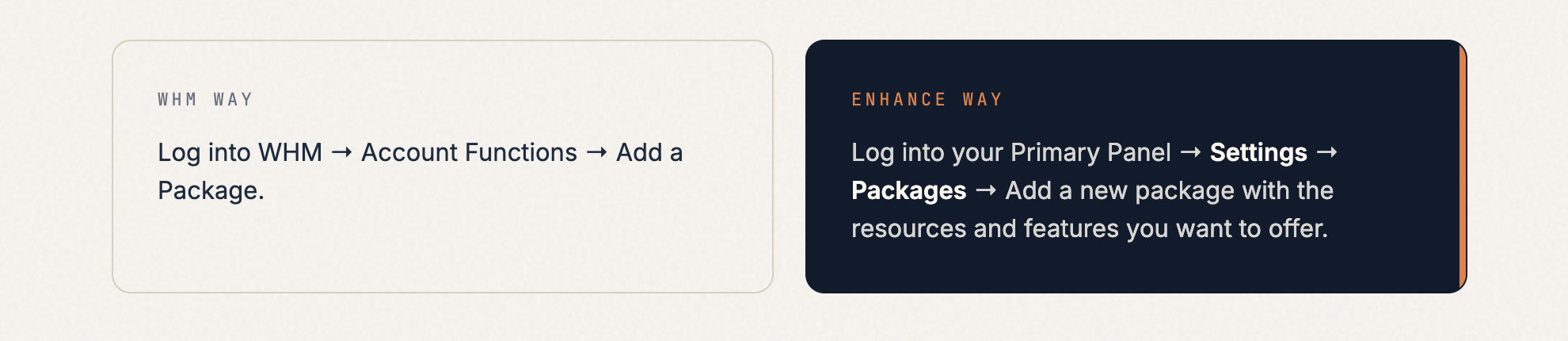 Packages in Enhance let you define disk space, bandwidth, number of websites, email accounts, databases, and a range of feature toggles — all in one cleanly laid-out screen.
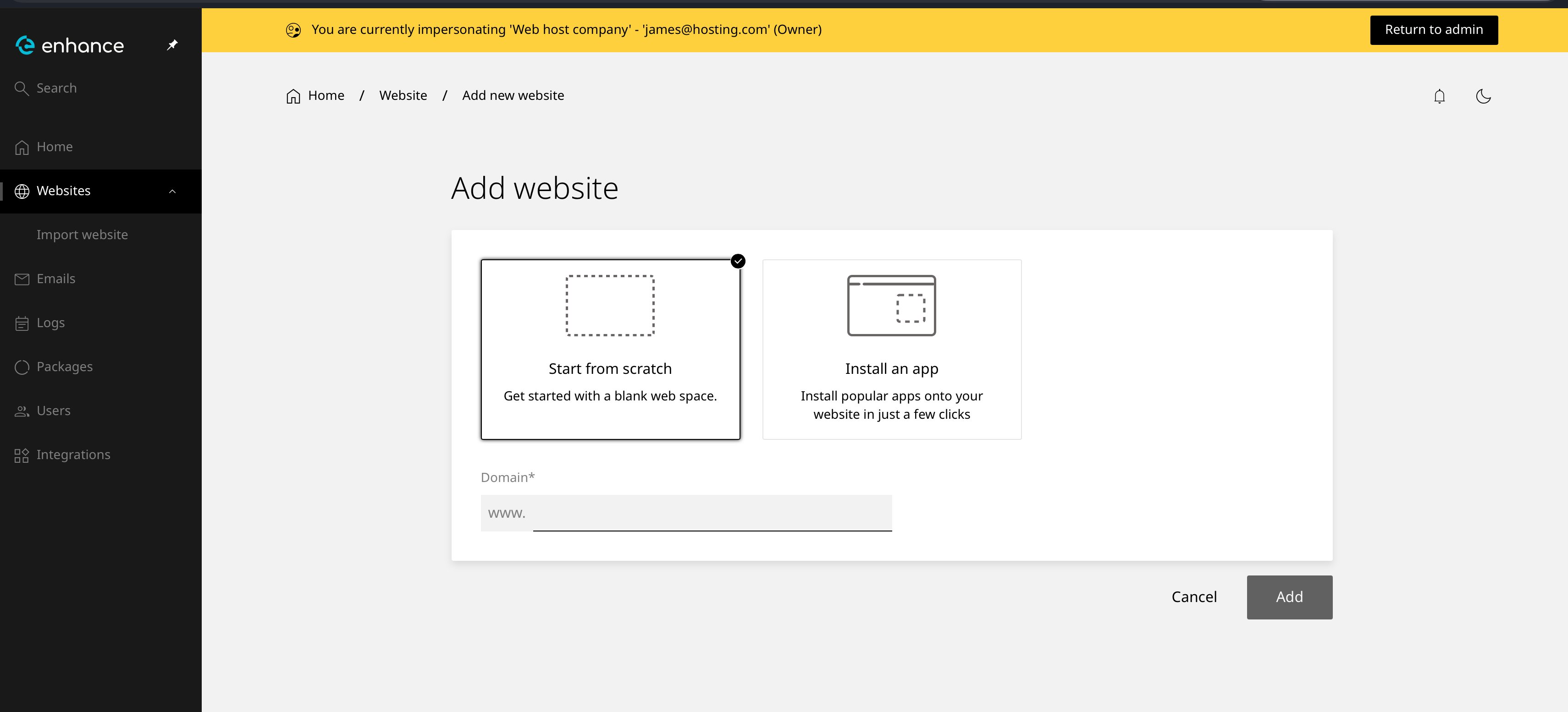
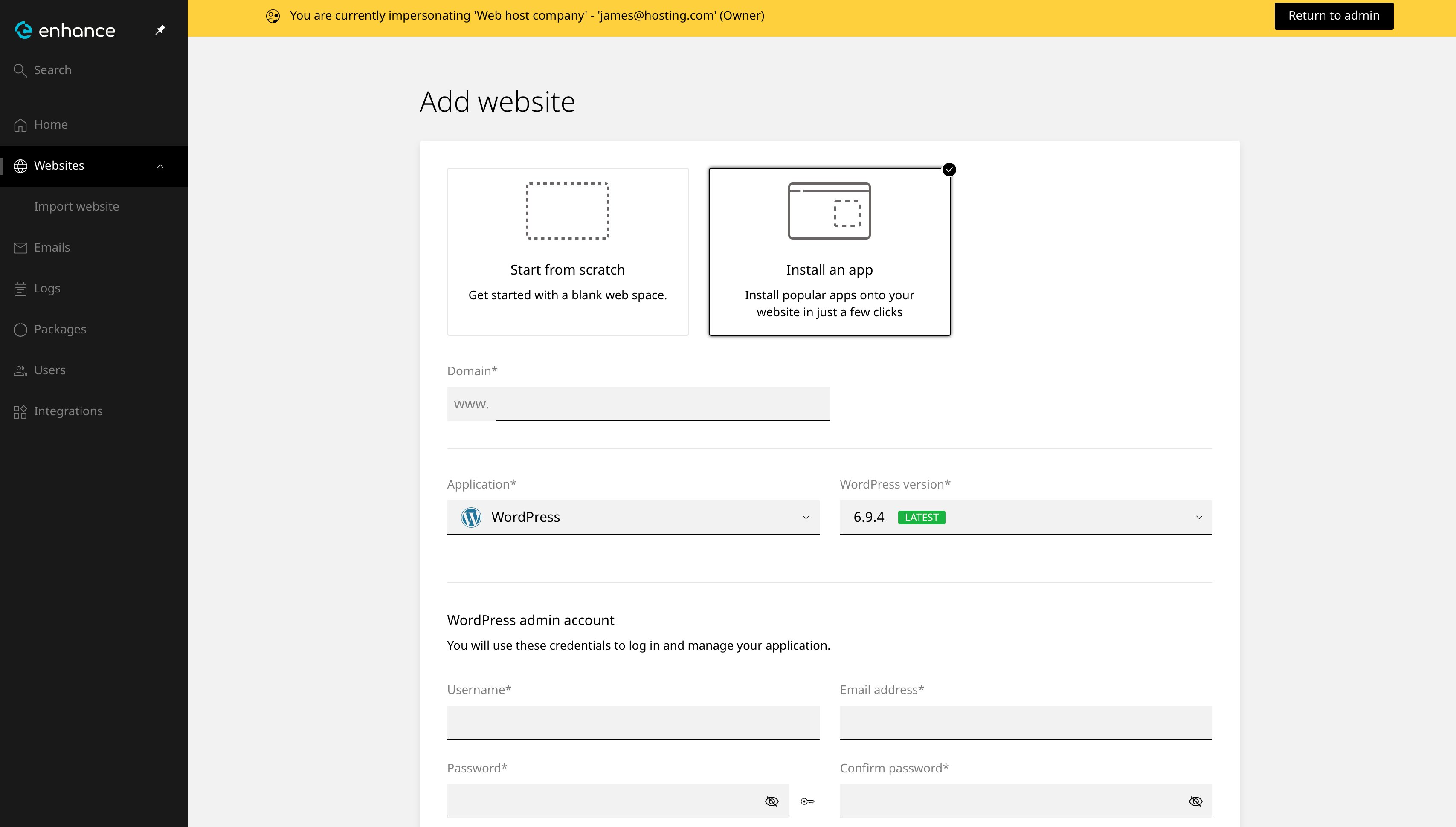
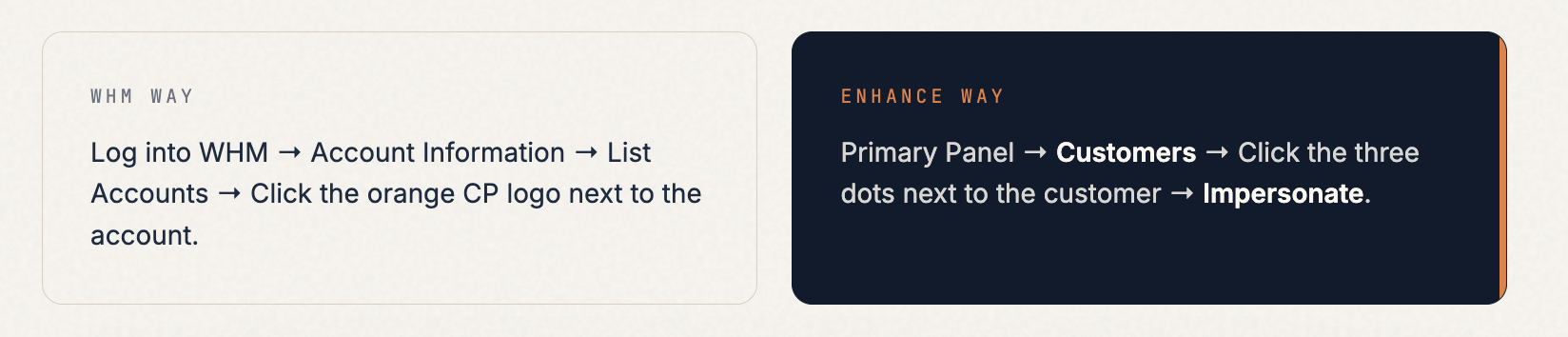
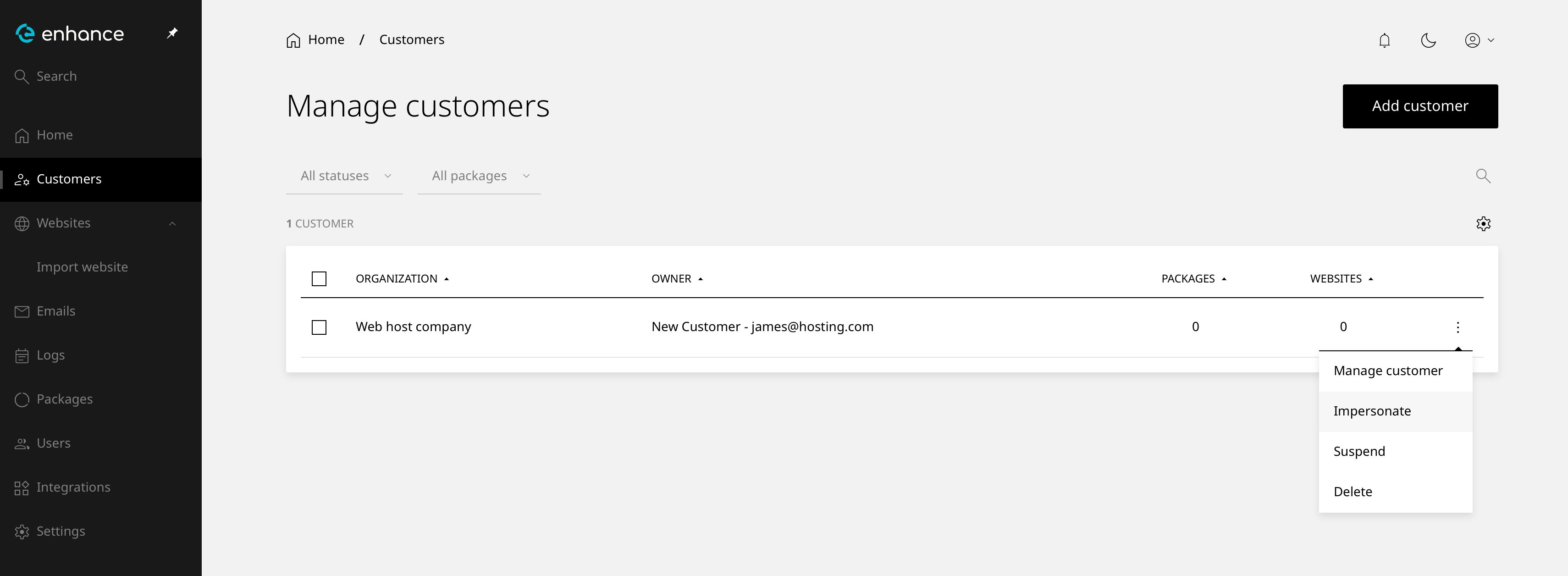 Once you impersonate, you’ll see a yellow banner across the top of the screen confirming you’re inside the customer’s account. A Return to Admin button in the top-right takes you back to your Primary Panel whenever you’re done.
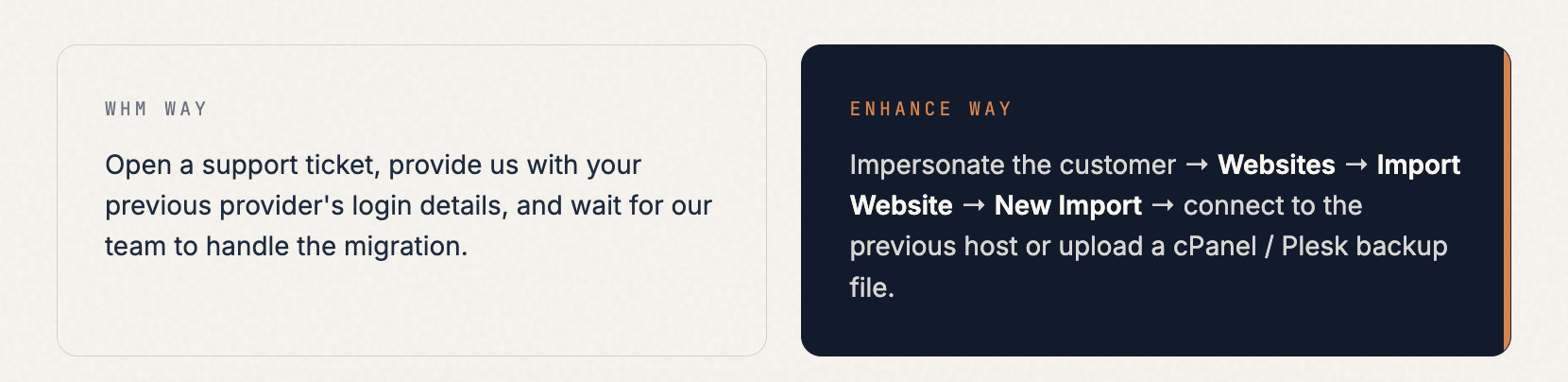
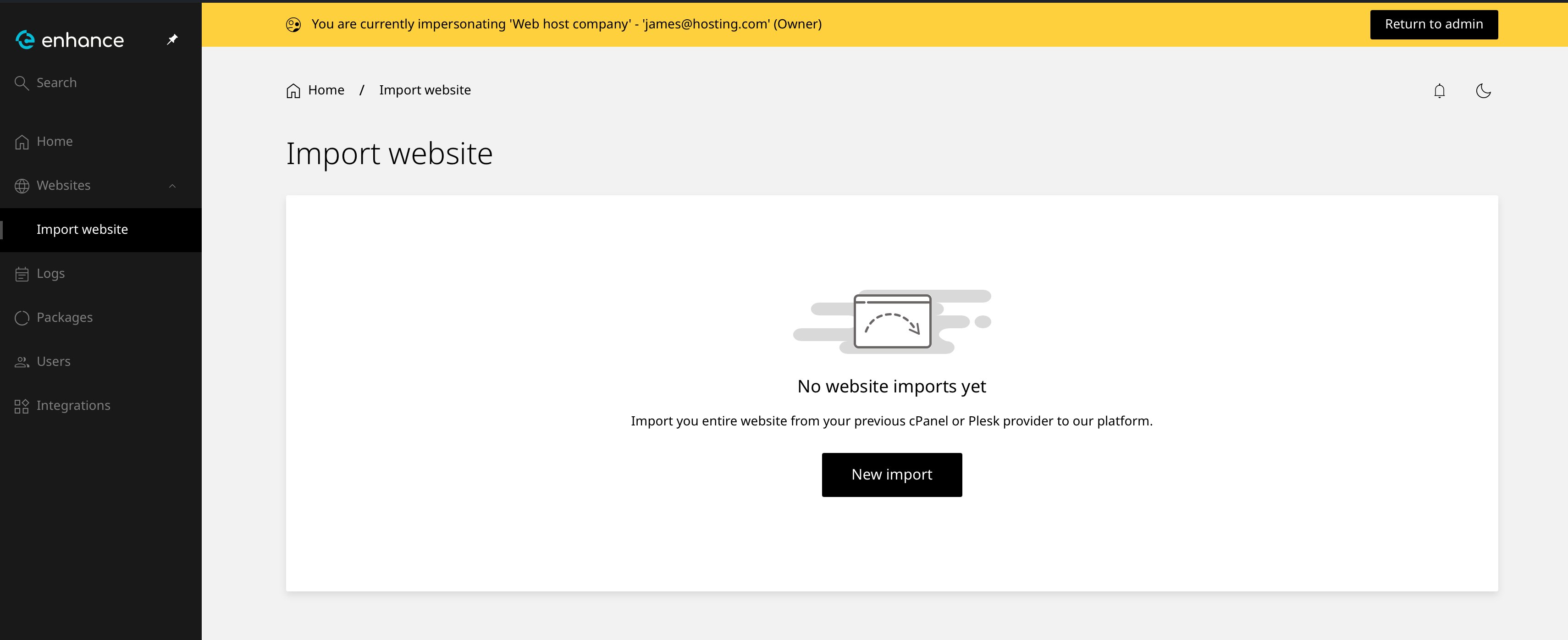 The entire site — files, databases, emails, DNS — is brought over automatically. No ticket, no waiting, no back-and-forth. For larger or more complex migrations, our support team is still here and can handle the full white-glove migration for you if you prefer.